Chat GPT AI is an artificial intelligence chatbot developed by OpenAI that understands everyday language and generates human-like responses to questions and instructions. It uses advanced language models to help people write content, research topics, solve problems, analyze information, and complete digital tasks through natural conversations.
Unlike a traditional search engine, ChatGPT allows users to ask follow-up questions, refine answers, and work through complex ideas without starting from scratch. Modern versions can also search the web, interpret images, examine uploaded documents, and assist with coding.
What makes Chat GPT AI especially useful is its flexibility. A student can use it to understand a difficult subject, while a business owner might use the same technology to examine sales figures or prepare customer communications.
However, getting reliable results requires understanding what the technology can do, where it struggles, and how to use it responsibly.
What Is Chat GPT AI and How Does It Work?
ChatGPT is a conversational AI application built around large language models (LLMs). These models learn patterns from extensive training data and use those patterns to generate responses based on the information and instructions they receive.
GPT stands for Generative Pre-trained Transformer. “Generative” refers to producing content, “pre-trained” describes the initial learning process, and “Transformer” identifies the neural network architecture behind the technology.
When I explain ChatGPT to beginners, I describe it as a digital assistant that can work with language and information rather than simply retrieve a predefined answer.
For example, I could ask:
“Explain compound interest to a 15-year-old using a savings account example.”
ChatGPT can produce a simple explanation. If the answer feels complicated, I can request an easier version or ask it to illustrate the concept with numbers.
What Happens When You Enter a Prompt?
The process involves several stages:
- ChatGPT receives the question or instruction, commonly called a prompt.
- The system processes the text into smaller units called tokens.
- Its language model interprets the request using patterns learned during training and the available conversation context.
- It generates a response based on those patterns and instructions.
- If suitable tools are available, it may search for information, analyze files, or perform other supported operations.
ChatGPT does not think or understand information exactly as a human does. Its responses can sound convincing even when they contain mistakes.
That distinction matters whenever accuracy is more important than speed.
How to Start Using Chat GPT AI
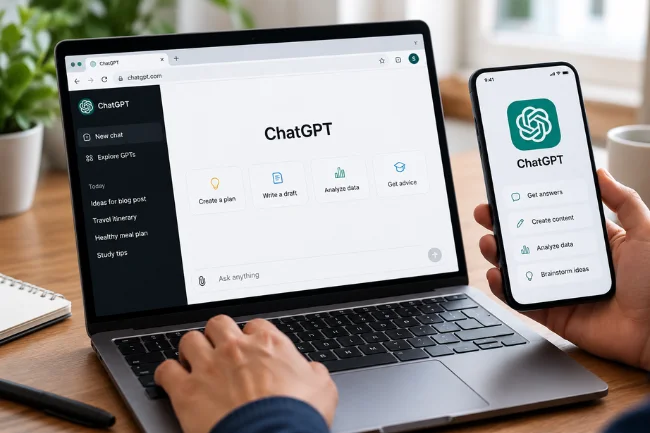
Getting started does not require programming knowledge or previous experience with artificial intelligence.
1. Visit the Official ChatGPT Website
Open chatgpt.com in your browser.
You can also use the official ChatGPT application on supported Android and iOS devices. Always verify the publisher before installing an app because similarly named services may have different pricing, privacy policies, or capabilities.
2. Sign In and Explore Your Options
Create an account or sign in to an existing one.
The available features depend on your subscription, region, device, and current rollout. Some tools may also have daily or periodic usage limits.
I recommend beginning with the free version before purchasing a subscription.
3. Enter a Specific Question
Instead of typing “Help me with marketing,” try:
“Suggest five affordable marketing ideas for a small clothing store targeting university students.”
A specific request gives the system useful direction.
4. Improve the Response Through Conversation
Your first answer does not need to be final.
You can request examples, change the writing style, specify a budget, or ask ChatGPT to explain how it reached a recommendation.
For an ongoing project, keeping related conversations and reference materials together can make subsequent work more consistent.
Major Features of Chat GPT AI in 2026
ChatGPT has expanded beyond basic question-and-answer conversations. Its capabilities now cover research, communication, creative work, and more sophisticated digital tasks.
Here is a practical comparison of its major features.
| Feature | What It Does | Useful For |
|---|---|---|
| AI chat | Answers questions and generates text | Everyday assistance |
| ChatGPT Search | Finds current information online | News and fact-finding |
| Deep Research | Investigates topics using multiple sources | Detailed reports |
| Image tools | Creates or edits visual content | Design and marketing |
| File analysis | Reads supported uploaded documents | Reports and summaries |
| Data Analysis | Examines structured information | Spreadsheets and charts |
| Voice conversations | Supports spoken interactions | Language practice |
| Projects | Organizes related chats and materials | Ongoing work |
| Plugins | Adds supported workflows and app connections | Productivity and automation |
Not every feature is available to every user. Access and limits may differ across plans.
GPT-6 and Intelligent UI
One of the significant developments in October 2026 was OpenAI’s introduction of GPT-6 with Intelligent UI in ChatGPT.
According to OpenAI’s October 7 announcement, GPT-6 can combine written explanations with visual and interactive elements when they improve an answer.
For example, instead of receiving only a paragraph about savings calculations, a user may receive an interactive calculator that allows different values to be explored.
GPT-6 began rolling out to eligible paid accounts on October 7, with the rollout expanding to Free and Go users from October 8.
This development makes the interface more adaptable, although access still depends on the account and rollout status.
ChatGPT Search vs Deep Research
These capabilities serve different purposes.
ChatGPT Search is useful when you need relatively quick information about recent developments, products, or publicly available facts.
Deep Research is intended for more involved investigations requiring information gathering, source review, and a structured report.
If I needed a quick definition of an economic term, ordinary chat would usually be sufficient. For a comparison of several industries using recent evidence, I would consider a research-focused tool.
Regardless of the method, I would still check important claims against their original sources.
Chat GPT AI Free vs Paid Plans: Which Should You Choose?
ChatGPT offers multiple subscription options, including Free, Go, Plus, Pro, and organizational plans.
The most appropriate choice depends on how frequently you use the platform and which capabilities your work requires.
| Plan | Best Suited For | Main Consideration |
|---|---|---|
| Free | Beginners and occasional users | Lower usage limits |
| Go | Regular users seeking an affordable upgrade | Regional pricing and feature limits |
| Plus | Writers, students, and professionals | Broader tool and model access |
| Pro | Frequent and demanding AI users | Higher subscription cost |
| Business / Enterprise | Teams and organizations | Administration, permissions, and workspace controls |
Paid access does not guarantee that every AI-generated answer will be correct.
I would choose a subscription based on actual workload rather than assuming the most expensive option will automatically produce the best result.
Since pricing, model availability, and limits can change, check OpenAI’s current plan information before subscribing.
Practical Uses of Chat GPT AI in Everyday Life
The biggest advantage of ChatGPT is that it can adapt to different types of work. Here are several applications where I believe it can provide meaningful value.
Content Writing and Digital Marketing
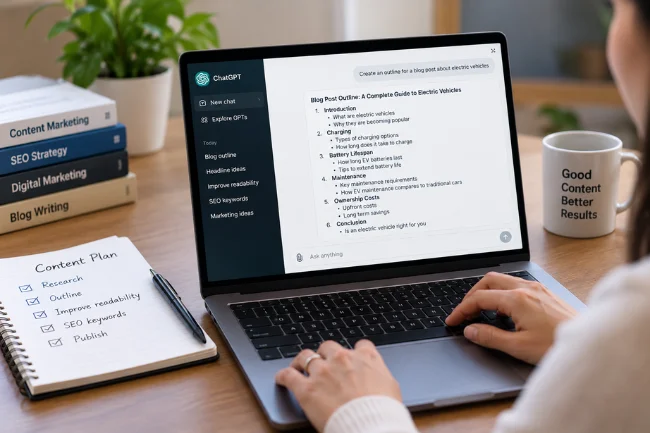
Writers can use ChatGPT to organize research, develop article outlines, improve readability, and generate alternative headlines.
For instance, a blogger preparing an article about electric vehicles could request a reader-focused outline covering charging, battery lifespan, maintenance, and ownership costs.
The generated outline offers a starting point, not a substitute for research.
I recommend combining AI assistance with original observations, credible sources, and an editorial review. Publishing unverified AI text can damage reader trust even when the writing sounds professional.
Education and Learning
Students can ask ChatGPT to explain complex subjects using simpler language.
It can help develop revision questions, practice mathematics, discuss historical events, or explain unfamiliar vocabulary.
Study Mode is particularly relevant because it encourages guided learning rather than always presenting an immediate answer.
I prefer using AI as a learning companion instead of an assignment-completion shortcut. Understanding why an answer is correct is more valuable than copying it.
Business Planning and Customer Communication
Small business owners can use ChatGPT to brainstorm promotions, draft professional emails, compare business ideas, and organize operational plans.
Consider a local bakery preparing a seasonal campaign.
A useful request would include its location, customers, available budget, and marketing channels.
ChatGPT could suggest promotional concepts, but the owner would still need to verify costs, customer demand, and local regulations before acting.
Data Analysis and Office Productivity
ChatGPT can work with supported CSV and Excel files to identify patterns, summarize information, and help create charts.
A store manager might upload a sales spreadsheet and ask:
“Identify the three best-performing product categories, compare monthly revenue, and explain any unusual changes.”
I would also request the formulas, assumptions, and data ranges used in the analysis.
That makes it easier to check whether the findings genuinely match the spreadsheet.
Coding and Technical Support
Programmers can use ChatGPT to explain code, identify possible bugs, generate tests, and discuss alternative implementations.
A beginner might ask why a Python function returns an unexpected result.
Experienced developers can use it to review logic or draft technical documentation.
However, generated code should be tested before deployment, especially when it involves security, financial transactions, or sensitive information.
How to Write Better Chat GPT AI Prompts
The quality of a response often depends on the quality of the instructions.
I use a simple four-part approach when developing a useful prompt: define the goal, explain the context, provide constraints, and specify the desired output.
Start With a Clear Goal
Tell ChatGPT exactly what you need.
A request such as “Write something about fitness” is too broad.
A better version would be:
“Create an informative article outline about beginner strength training for adults who exercise at home.”
Add Relevant Context
Explain who the content is for and why it is needed.
For example:
“The audience consists of adults with little exercise experience. The article should use simple language and explain unfamiliar terminology.”
Context helps reduce irrelevant responses.
Include Constraints
Mention requirements such as length, tone, structure, available resources, and information that should be excluded.
You can also tell ChatGPT not to invent statistics or citations.
Specify the Output Format
Ask for a table, checklist, short explanation, email, comparison, or structured report.
For example:
“Present the recommendations in a table with columns for activity, required equipment, and estimated difficulty.”
This gives ChatGPT a clearer target.
Improve Results With Follow-Up Prompts
I recommend treating the first response as a working draft.
Follow-up instructions might include:
- “Which assumptions in this answer need verification?”
- “Explain the second recommendation with a realistic example.”
- “Remove repeated ideas and make the language more conversational.”
- “Identify information that may be outdated.”
- “Rewrite the answer for readers with no technical knowledge.”
These questions can reveal weaknesses that are easy to overlook in a polished-looking response.
My Approach to Getting More Reliable AI Answers
One area that deserves greater attention is the difference between useful writing and dependable information.
ChatGPT can create an impressive explanation without establishing whether every statement is supported.
I recommend a three-stage review before using its output for anything consequential.
Stage 1: Check the Input
Start by examining the material you supplied.
Does the request include enough background? Are the figures current? Have you clearly separated facts from assumptions?
Incomplete instructions can produce misleading results even when the model follows them correctly.
Stage 2: Examine the Output
Look for unsupported numbers, questionable references, missing context, and conclusions that sound more certain than the evidence allows.
When recent information matters, request sources and open the original pages.
A citation is useful only if the referenced source actually supports the statement.
Stage 3: Verify Before Acting
Finally, decide whether the answer is safe to use as written.
A social media caption requires a different level of scrutiny from tax advice, medical information, or a financial forecast.
For high-stakes decisions, consult qualified professionals and authoritative sources rather than relying on an AI response alone.
This approach makes human judgment part of the workflow instead of an afterthought.
Is Chat GPT AI Safe? Privacy and Data Protection
ChatGPT includes privacy controls, but users should understand what they are sharing.
I would avoid entering passwords, private customer records, confidential contracts, or sensitive medical details unless the intended service and its data-handling terms are appropriate for that information.
Review Your Data Settings
Open ChatGPT Settings and locate Data Controls.
For personal accounts, the “Improve the model for everyone” option controls whether eligible conversations may be used for model improvement.
Memory preferences are managed separately under Personalization.
The available controls can depend on the account or workspace.
Understand Temporary Chat
Temporary Chat allows conversations to remain outside normal chat history unless saved.
Temporary conversations are not used for model improvement while they remain temporary. Depending on the selected option, they may still use existing personalization, although they do not create new memories.
OpenAI may retain a copy for up to 30 days for safety purposes.
Users should also review permissions and privacy terms before connecting third-party services through plugins.
For further details, consult OpenAI’s data-control guidance.
Limitations of Chat GPT AI You Should Understand
Despite its capabilities, ChatGPT has several weaknesses.
The most significant is hallucination, which occurs when an AI system produces incorrect or unsupported information as though it were factual.
It may also misunderstand ambiguous instructions, overlook context, generate inaccurate code, or make errors when interpreting complicated documents.
Another limitation involves current information. Without an appropriate search or connected source, ChatGPT may not have access to the latest developments.
AI-generated content may also lack personal insight, cultural understanding, or the practical judgment needed for sensitive situations.
I would never assume that a confident writing style proves an answer is accurate.
Common ChatGPT Problems and How to Fix Them
A few common problems can often be addressed without advanced technical knowledge.
If ChatGPT gives a vague answer, add details about your objective, intended audience, and required format.
If it repeats information, ask it to identify duplicated ideas and consolidate overlapping sections.
For inaccurate answers, request supporting sources and independently verify the important details.
When file uploads fail, check that the document uses a supported format, does not exceed the applicable limit, and is being uploaded through a supported app or browser.
If a feature is missing, review your subscription, selected model, workspace permissions, and app version. Some capabilities are introduced gradually rather than becoming available to everyone simultaneously.
Will Chat GPT AI Replace Human Jobs?
Artificial intelligence is changing how people perform tasks involving writing, research, programming, analysis, and customer service.
However, replacing individual tasks is not necessarily the same as replacing an entire occupation.
Many jobs require judgment, accountability, negotiation, trust, and practical experience that AI-generated responses cannot independently provide.
My view is that learning to work effectively with AI is more useful than treating it as either a complete replacement for human skills or something that can be ignored.
People who understand both its capabilities and limitations may be better prepared to use it productively.
Conclusion
Chat GPT AI has developed into a versatile assistant for learning, writing, research, data analysis, and everyday productivity. Its value comes from combining useful AI capabilities with clear instructions and informed human decisions.
I recommend starting with one real task, writing a specific prompt, checking the response, and improving it through follow-up questions. That practical experience will help you determine where ChatGPT genuinely saves time and where your own expertise remains essential.
FAQs About Chat GPT AI
Is Chat GPT AI free to use?
Yes. ChatGPT offers a free plan with usage limits. Paid subscriptions provide additional access and features.
Can Chat GPT AI provide current information?
Yes. ChatGPT Search can retrieve current information from the web, although important facts and sources should still be verified.
Can Chat GPT AI create images?
Yes. Supported ChatGPT plans offer image-generation and editing capabilities, subject to availability and usage limits.
Is Chat GPT AI better than Google?
They serve different purposes. ChatGPT is useful for conversational assistance and content generation, while Google Search is designed primarily for discovering web information.
Can Chat GPT AI make mistakes?
Yes. ChatGPT can produce inaccurate facts, calculations, or references. Human review is essential when accuracy matters.

Noah Sterling is a technology research writer with 8+ years of experience covering emerging technologies, software trends, digital tools, and innovation. He creates practical, research-based articles to help readers understand the evolving technology landscape.