An UberEats Promo Code is a promotional code or account-based offer that can reduce the cost of an eligible Uber Eats order. Depending on the promotion, the saving may be a percentage off, a fixed-value discount, reduced delivery costs, or another offer shown in the Uber Eats app. A code normally has conditions attached to it, such as a minimum order value, location, expiration date, eligible user type, merchant, or currency.
The most important thing I tell readers is that an UberEats Promo Code is not the same as a guaranteed discount for every account. Uber states that promotions can be limited by geography, user eligibility, and other offer-specific terms, and a promo must be applied before the order is placed.
For this article, I checked Uber’s current help guidance in October 2026 rather than relying on recycled coupon lists.
That explains why a code that works for one person may show as invalid or ineligible for another. The best way to judge any offer is to read its terms and confirm the discount in the checkout total before placing the order.
How Does an UberEats Promo Code Work?
Uber Eats promotions are attached either to a code you enter or, in some cases, directly to your account. Uber’s help pages say that some promotions are added automatically, while others need to be entered through the Promotions section or during checkout.
Once the promotion is on your account, Uber Eats checks whether your order meets the offer’s conditions. That check can involve your account status, location, selected restaurant or store, basket value, currency, and expiration date.
If the promotion qualifies, you should see the discount in the order-charge breakdown before you confirm the purchase. If the saving is not visible there, I would not assume it will be added later. Uber says forgotten promo codes cannot be applied after an order has been placed.
The Four-Layer Promo Eligibility Check
I use a simple four-layer framework when evaluating an Uber Eats coupon or discount code:
| Eligibility layer | What to check | Common reason a promo fails |
|---|---|---|
| Account | New user, existing user, targeted recipient, matching email | Offer was sent to a different account or user type |
| Location | Country, state, city, currency | Code belongs to another market |
| Basket | Merchant, eligible items, minimum spend, order type | Cart does not satisfy the promo terms |
| Timing | Expiration date and redemption status | Code expired or was already used |
This framework matters because the message “promo not applied” does not necessarily mean the code itself is fake. It can mean the code is genuine but your order does not match one of its eligibility layers.
Uber specifically notes that some offers are restricted to first-time users, certain places, or people who received the promotion by email or in-app notification. For targeted email offers, the email associated with the Uber account may need to match the address that received the promotion.
How to Add an UberEats Promo Code
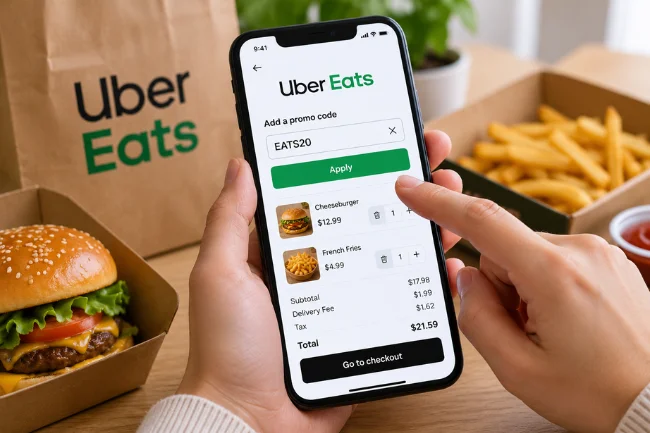
The exact wording in the app can change by version or market, but Uber’s current help instructions follow a straightforward path.
Open Uber Eats and go to your profile or Account area. Select Promotions, choose the option to add a promo, enter the code exactly as provided, and add it to your account. Some promotions may already be present because Uber can add eligible offers automatically.
You can also check your cart before ordering. Uber says users can scroll to the promo section, review an already selected offer, and choose another eligible promotion if they prefer. The code must be applied before the order is placed.
Always Check the Final Price Before Ordering
A successful code entry is only half of the job. I recommend checking the final order breakdown and confirming that the Promotion line or discount actually appears.
This is especially useful when multiple offers are visible on an account. Uber says merchant promotions can be applied first, followed by an eligible account promotion, and users may be able to choose a preferred account promo or save one for another order.
The checkout screen is more useful than a coupon website’s “verified” badge because your account and current basket determine whether you qualify now.
Where Can You Find a Legitimate UberEats Promo Code?
The safest places are the channels connected directly to your Uber account. I would check the Promotions section in the Uber Eats app first, followed by legitimate emails and in-app notifications from Uber.
Targeted promos deserve special attention. A publicly posted code can look attractive, but Uber explicitly says that some promotions only work for selected users or for the account that received the offer.
Promotions may also be tied to a specific restaurant or store. These offers can appear automatically when the merchant is eligible, so there may be nothing for you to type.
Coupon sites can help with discovery, but I treat them as leads rather than proof. Check the date, country, user type, minimum spend, discount cap, and whether the offer is account-specific.
New User vs. Existing User Promo Codes
One of the most common search mistakes is assuming every Uber Eats discount code works for both new and returning customers.
| Promo type | Typical audience | What to verify |
|---|---|---|
| New-user offer | First-time or qualifying new customers | Definition of “new,” account eligibility, first-order requirement |
| Existing-user offer | Selected returning customers | Whether the offer is targeted or broadly available |
| Merchant promotion | Customers ordering from a participating store | Restaurant/store location, item rules, order minimum |
| Account-targeted offer | Specific users who received the promotion | Correct account, email, region, expiration |
| Membership-related saving | Eligible members | Participating merchants, order minimums, membership terms |
Uber’s help documentation confirms that some promos are limited to certain user types, including first-time users.
For existing users, the most reliable offer is usually one visible inside the account rather than a code copied from an old forum post. Community-shared codes can be region-specific, targeted, or expired, which is why reports about the same code often conflict.
Why Is My UberEats Promo Code Not Working?
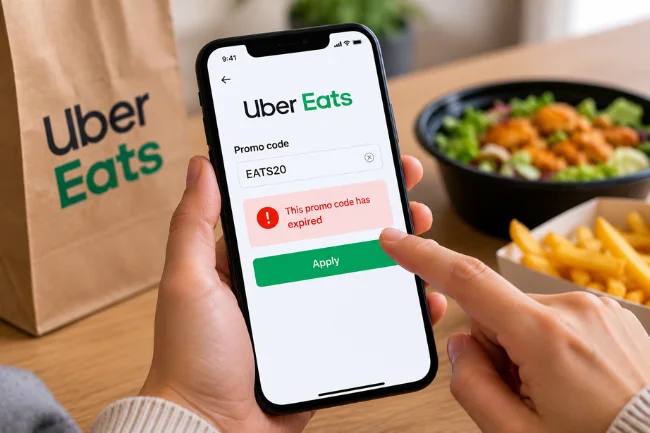
When a promo fails, I work through the conditions instead of entering the same code repeatedly. Most failures fall into a small number of categories.
1. The Code Has Expired
Active promotions can display an expiration date in the app, while redeemed or expired offers can appear in the past-promotions area. Uber advises checking the offer’s expiration and using it before that deadline.
For a scheduled order, timing deserves extra attention. In at least some markets, Uber warns that if a promotion expires by the scheduled-order date, the discount may not apply.
2. The Offer Is for a Different Location or Currency
A code may be restricted to a city, state, country, or specific currency. This is why a working US Uber Eats coupon, for example, should not be assumed to work in another country.
Uber specifically tells users to verify the applicable location and currency when troubleshooting a promotion.
3. The Promo Is Only for Certain Users
Some discounts are designed for new customers. Others are targeted to selected existing customers based on an email, in-app offer, campaign, or account eligibility.
If the promotion was sent to a particular email address, Uber says the account used for the order may need to have that same email address.
4. Your Order Does Not Meet the Offer Terms
A promotion may require a minimum basket value, a specific merchant, an eligible category, or another condition listed in the offer details.
The smart move is not to add unnecessary food simply to cross a threshold. Compare what you were already going to buy with the minimum spend and the maximum possible discount.
A “40% off” code with a low discount cap can be less valuable than a smaller percentage offer with a higher usable cap.
5. Another Promotion Is Being Selected
Uber says merchant promos can take priority, and the highest-value eligible account promo may be selected next. Users can sometimes choose a preferred promotion or use none and save an offer for later.
If the code you expected is not showing, inspect the promotion details in the cart rather than assuming the app ignored it.
6. The Code Was Already Redeemed
Many promo codes are one-time-use offers. Uber also states that unused value from a single promotion does not roll over to a later order.
If you are unsure whether an offer was previously used, check your past orders and receipts. A successful promotion should be shown in the price breakdown.
Can You Stack Uber Eats Promo Codes?
Generally, Uber says promo codes cannot be combined and only one promo code can be applied to an order.
That does not mean every kind of saving is mutually exclusive. Merchant promotions may be applied before an eligible account promo, and in markets where Uber One benefits are offered, Uber says qualifying Uber One benefits can apply before an eligible promo code. Availability and rules vary by market and offer.
A promo code is a specific promotional offer, a merchant deal is tied to a participating store, and a membership benefit is attached to an eligible subscription. They can interact differently, so the final order summary is the reliable stacking check.
Does a Promo Code Remove All Uber Eats Fees?
No. A discount on food does not automatically remove every fee.
Depending on the market and order, Uber Eats may show charges such as a delivery fee, service fee, small-order fee, long-range fee, priority fee, or other applicable charges. The exact fee structure varies by location and order.
A $0 delivery-fee promotion can also be narrower than it sounds. Uber’s help terms for one such promotion state that the delivery fee is reduced to zero while other costs, including service fees, can still apply.
That is why I measure a promotion by the final payable total rather than the headline discount.
A Better Way to Calculate the Real Saving
Use this simple comparison:
Real saving = checkout total without the promo − checkout total with the promo
Compare the same basket, merchant, delivery option, and address. This gives you a cleaner answer than focusing on the advertised percentage alone.
For example, if a 30% discount is capped at $10, an eligible $60 basket does not produce an $18 saving; the cap limits the promo portion to $10.
If adding extra items only increases the basket without increasing the capped discount, the “bigger” order is not actually a better deal.
Optimize for what you were already planning to spend, not for the largest percentage printed on the offer.
How to Get More Value From Uber Eats Promotions
I use three rules when comparing food-delivery offers.
First, read the maximum discount before the percentage. “50% off up to $8” and “25% off up to $15” can produce very different results depending on your basket.
Second, check the minimum spend against your normal order. If you have to buy $12 of food you did not want to unlock a $7 saving, you have not saved money.
Third, compare the final total across delivery and pickup when both are available to you. A large promo can be offset by order-specific fees, while a smaller discount on a lower-cost fulfillment option can produce the better final price.
I also avoid building an order around an unconfirmed coupon. I add the food I actually want first, then test the available promotion. That keeps the discount from becoming a reason to overspend.
Are Online Uber Eats Coupon Codes Safe?
The code itself is usually just a string of letters or numbers, but the website asking you to “unlock” it may not be trustworthy.
A normal promotion should not require you to give a third-party coupon site your Uber password, one-time login code, payment-card PIN, or other sensitive credentials.
If a site asks you to sign in outside an official Uber flow simply to reveal a discount, I would leave.
Be cautious with offers promising impossible savings, unlimited redemptions, or “account generators.” Discover offers wherever you like, but redeem them only through the official Uber or Uber Eats interface and verify the saving before ordering.
What to Do If a Valid Promo Still Does Not Apply
Start by opening Promotions and confirming that the offer is active. Then check the location, currency, expiration date, account eligibility, merchant restrictions, and basket requirements.
Next, return to checkout and see whether another promotion is selected. If your chosen promo is eligible, select it before placing the order.
If you already completed the order, view the receipt. Uber says the discount should appear as a Promotion line when it applied successfully. If you believe an eligible promo was added correctly but the discount failed, Uber’s help flow provides a way to report the issue.
What you should not do is place the order expecting support to add a forgotten code afterward. Uber explicitly states that promotions need to be applied before the order is placed.
Final Takeaway
An UberEats Promo Code can reduce the cost of an eligible order, but the real value depends on the terms attached to that specific offer. The code, account, location, basket, merchant, and timing all have to line up.
My preferred approach is simple: check the Promotions section first, read the conditions, build the order you actually want, and confirm the discount in the final price before tapping the order button.
If you are looking for an Uber Eats promo today, start inside your own account. A personalized, active offer shown there is usually more useful than a “working” code copied from an old coupon page.
Frequently Asked Questions
How do I get an UberEats Promo Code?
Check the Promotions section of your Uber Eats account, along with legitimate Uber emails and in-app notifications. Some offers are added automatically or targeted to selected users.
Why is my Uber Eats promo code not working?
The offer may be expired, already used, limited to another location or currency, restricted to certain users, or incompatible with your current order. Check the promo terms and checkout details.
Can existing users get Uber Eats promo codes?
Yes, existing users can receive promotions, but some offers are targeted rather than available to everyone. The Promotions section in your account is the best place to check your current eligibility.
Can I use two Uber Eats promo codes on one order?
Generally, no. Uber says only one promo code can be applied per order, although merchant promotions or eligible membership benefits may interact separately with account promos.
Can I add an Uber Eats promo code after ordering?
No. Uber says promo codes must be added before the order is placed and cannot be applied afterward if you forgot to use one.

Ethan Caldwell is a business research writer with 9+ years of experience covering entrepreneurship, market trends, business strategies, and industry insights. He focuses on creating clear, data-informed articles that help readers understand modern business concepts.