Coursicle is a college course-planning and academic organization platform that helps students build class schedules, monitor full courses for available seats, and manage assignments in one place. Its website and mobile app show supported schools’ course offerings in a visual timetable, while open-seat notifications alert students when a tracked section becomes available. Coursicle also offers professor reviews, syllabus uploads, and assignment syncing with learning platforms such as Canvas and Blackboard.
The key distinction is simple: Coursicle helps you prepare for registration and stay organized, but it does not replace your university’s official enrollment system. You still register through your school. I think that distinction is the best starting point for understanding what the tool can—and cannot—do for a student.
What Is Coursicle Used For?
Most colleges already have a course catalog, registration portal, learning management system, and academic calendar. The problem is that these tools often live in different places. A student might check one website for class availability, another for assignments, and a third for important dates.
Coursicle tries to connect those everyday tasks. Before registration, it works as a college class schedule planner. During registration, it can watch selected full sections and send open-seat alerts. Once the semester begins, it functions as a college assignment tracker and a home for upcoming classes and deadlines.
According to Coursicle’s company overview, more than two million students use the service. Its school coverage and individual features still vary, so I would check the exact institution and semester before depending on it.
For me, its value lies in reducing repetitive tasks: searching catalogs, comparing lectures, and checking deadlines.
Coursicle Features That Matter Most
Visual Class Schedule Builder
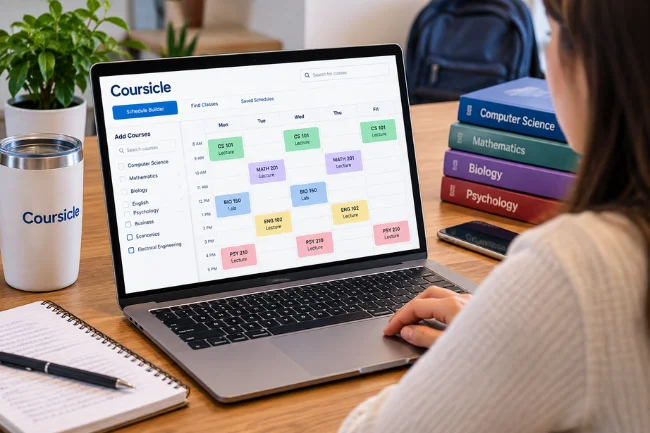
The schedule maker lets students search their institution’s available courses and place sections into a weekly calendar. Instead of mentally comparing lecture times, you can see which classes overlap, where you have long gaps, and whether your timetable leaves room for work or commuting.
For example, a ten-minute gap between lectures may look fine on paper. If the buildings are fifteen minutes apart, the schedule is impractical. You still need to assess walking time yourself.
You can also prepare backup combinations. That matters because an attractive timetable built around one highly demanded laboratory section can fall apart when registration opens.
Open-Seat Notifications for Full Classes
One of Coursicle’s best-known features is class tracking. If a course section is full, you can choose to monitor it. When the service detects an available seat, it can send a notification so you can return to your university’s registration portal.
This helps with required classes, popular electives, and sections that fit work commitments, without constant manual refreshing.
There is an important catch: an alert is an opportunity, not a reserved seat. Availability can change quickly, and eligibility rules, registration holds, or an official waitlist may prevent enrollment. Coursicle does not register on your behalf, as Creighton University’s guidance also explains.
I would keep official waitlist notifications enabled even while tracking the same section in Coursicle. The two systems serve different purposes and may not show identical availability.
Assignment Tracking and Learning Platform Sync
Coursicle has grown beyond course selection. It now supports assignment syncing from Canvas, Blackboard, Brightspace, Moodle, Sakai, and Google Classroom, according to its 2026 feature overview.
The aim is to gather homework, quizzes, and exams in one calendar. Reminders and color coding can reveal weeks with competing deadlines.
Still, I would never treat a synced planner as more authoritative than a professor’s announcement or the original learning management system. If an instructor changes a deadline late in the evening, verify the new date at its source, particularly for high-stakes assessments.
Syllabus Upload and Automatic Deadline Extraction
A newer feature allows students to upload a syllabus as a PDF, scan, or image. Coursicle attempts to identify dates and tasks, then presents them for review before saving them to the planner.
This can be particularly helpful when a professor lists reading schedules and assessment dates in a document but does not enter every item into Canvas. You can correct task names, dates, and duplicates before importing them.
My advice is to check the academic year, time zone, and ambiguous date formats carefully. A line reading “03/04” can be interpreted differently, and an old syllabus may contain dates from a previous term. The company’s syllabus upload explanation also recommends reviewing extracted results.
Professor Reviews, Sharing, and Student Connections
Coursicle offers professor reviews associated with students at a particular institution. Reviews may help you identify patterns in teaching style, assessment workload, or classroom expectations, but a handful of opinions cannot predict your experience.
I would look for specifics—clear grading rubrics or frequent quizzes—rather than treating a rating as the final verdict.
Schedule sharing, Google Calendar integration, and class-based chat features can also make coordination easier. Their usefulness depends on whether your school, course, and preferred workflow support them.
Coursicle Free vs. Premium: What Do You Get?
Coursicle has a useful free tier, although students who need to monitor several competitive sections may find the paid version more relevant. The company’s September 2026 pricing explanation describes these limits:
| Feature | Free version | Premium version |
|---|---|---|
| Course search and visual scheduling | Included | Included |
| Saved schedule variations | Up to 2 | Unlimited |
| Open-seat tracking | 1 class at a time | Unlimited tracked classes |
| LMS assignment syncing and syllabus uploads | Included | Included |
| Manually created tasks | Up to 7 | Unlimited |
| Reminders and appearance | Standard options | More customization, themes, and widgets |
| Week-ahead summary emails | 3 included | Unlimited |
Prices can depend on the platform and purchase option. I would check the current amount in the app before subscribing instead of relying on an old article or screenshot.
The free plan is enough to evaluate whether the timetable and assignment tools fit your routine. Premium becomes easier to justify when you are simultaneously tracking multiple sections that are essential to graduation or a tightly constrained schedule.
According to Coursicle, you can plan without an account; signing in enables cross-device syncing. External connections may require permissions.
How to Use Coursicle Before and During Registration
1. Confirm Your School and Semester
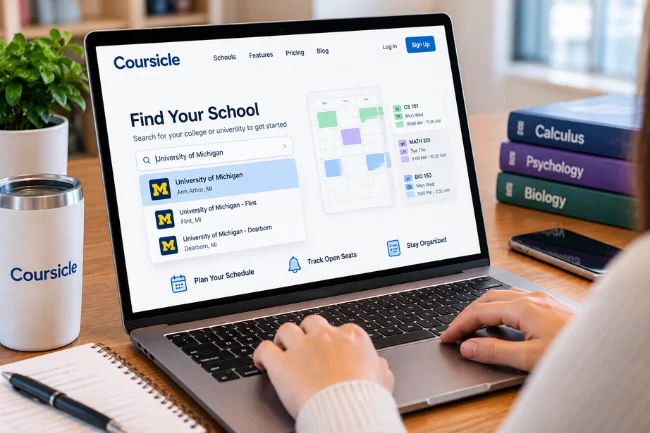
Start at Coursicle’s website and search for your college or university. Check that the relevant term is available and that the course titles, section numbers, and meeting times agree with your university’s catalog.
This matters because a school may appear in the directory while current registration information is incomplete. I recommend verifying one course you already know well before building your entire schedule.
2. Build a Primary Schedule and a Backup
Add your required courses first, followed by electives and preferred instructors. Check for time conflicts, then consider travel, meals, study blocks, and employment.
Next, create a second version that avoids your most competitive section. A backup schedule is not pessimism; it is a practical way to prevent one unavailable seat from disrupting everything else.
For linked lecture-and-lab courses, confirm whether the university requires particular section combinations. A timetable can look conflict-free yet still be impossible to register for because of a linked enrollment rule.
3. Track a Full Section Without Ignoring the Waitlist
If your preferred section is full, enable seat tracking where supported and allow the app’s notifications. Keep your phone notifications functional, and make sure you can log into the official registration system quickly.
Meanwhile, join the university waitlist if you are eligible and review alternatives. Some schools automatically offer seats to waitlisted students; others require a response within a deadline. An apparent opening is not always available to the next person who clicks.
Keep the course registration number handy so you can act quickly when an alert arrives.
4. Switch From Registration Mode to Semester Mode
After enrolling, compare the saved schedule against your official course list. Remove classes you did not get, then import assignment deadlines from your learning platform or syllabi.
I recommend checking the coming week every Sunday and verifying major deadlines in the original course pages.
Coursicle vs. Your School Portal vs. Google Calendar
These services overlap, but they solve different problems. I would choose them based on the decision I am trying to make, not on which interface looks the nicest.
| Tool | Best use | Main limitation |
|---|---|---|
| Coursicle | Comparing college course sections, monitoring seats, organizing academic tasks | Third-party data and alerts are not enrollment guarantees |
| University registration portal | Official registration, prerequisites, holds, waitlists, and enrollment status | Planning experience may be less visual or flexible |
| Google Calendar | Combining classes with personal events, work, and daily reminders | Does not inherently know course-seat availability or registration rules |
| Canvas or another LMS | Viewing instructor-posted content, submitting work, checking grades | Information may be spread across individual course spaces |
In practice, I would use the registration portal as the source of truth for enrollment, the LMS as the source of truth for coursework, and Coursicle as a planning layer. Google Calendar can remain the broader picture of the week.
That division of responsibility prevents a common mistake: expecting one convenient app to replace systems it does not control.
My Practical Test for a Better College Schedule
Avoiding overlaps is necessary, but insufficient. I suggest five questions to judge whether a timetable is livable:
- Travel: Can I move between buildings without rushing, including on rainy days?
- Energy: Have I packed difficult classes into the hours when I am least alert?
- Flexibility: What happens if one essential section fills up or moves online?
- Workload: Do I have uninterrupted study time before demanding labs or exams?
- Registration: Have I checked prerequisites, restrictions, and linked sections in the official portal?
Give each question a score of zero for a serious problem, one for a manageable concern, or two for a solid plan. A schedule scoring eight to ten is a useful starting point; one scoring five or below deserves another look.
This is my own decision framework, not an official Coursicle rating or a scientific measure. Its value is making hidden trade-offs visible. A four-day timetable that scores poorly on travel and energy may be worse than a five-day schedule with calmer transitions.
What Coursicle Cannot Guarantee

Seat Alerts Can Be Too Late or Unusable
Even accurate availability information can become outdated before you act. A student may claim a seat, a department may reserve capacity, or a waitlist may have priority. Notification settings, connectivity, and school data access can also affect your experience.
When a class is essential for graduation, contact an academic advisor early. Ask about approved substitutions, override policies, and alternative sections. I would never make a graduation plan depend on a single app alert.
Course Details and Imported Tasks Need Checking
Instructor assignments, classroom locations, and examination dates can change. Automated syllabus extraction may misread tables or duplicate an assignment. Similarly, a synced task list is only as complete as the information available in its source.
I recommend a quick verification immediately after importing a syllabus and another review whenever an instructor announces a change. Compare high-priority details against university records rather than assuming a colorful schedule is automatically correct.
Privacy Deserves a Deliberate Choice
Academic calendars can reveal where you will be, which classes you take, and details of your assignments. Before linking external services, review the permissions being requested.
Coursicle’s privacy policy says it requests Google permissions to retrieve Classroom assignments and Calendar events, and that related data is stored on its servers. It also describes certain diagnostic circumstances in which data may be shared with a third-party language-model service.
That does not automatically make the app unsuitable. It means students should decide whether the convenience of syncing justifies the data access, especially when using a school-managed account. If you are unsure, ask your campus IT department and begin with manual schedule planning.
Is Coursicle Worth Using in 2026?
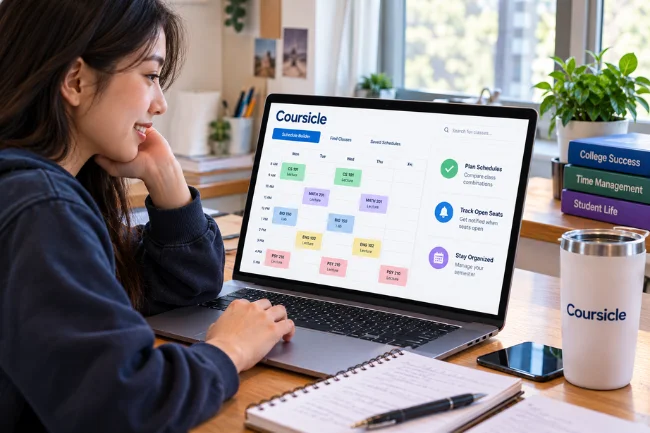
For students whose schools are supported, I think the answer is generally yes—at least for trying the free features. The schedule builder offers a more readable way to compare class combinations, while a single free open-seat alert can be valuable during registration.
It is especially useful if you have a job, commute between campuses, need a particular lab section, or manage assignments across several learning platforms. Those situations create the most scheduling friction.
Premium is a narrower decision. If you only monitor one class and are satisfied with standard reminders, paying may add little. If you are tracking five full sections and need several backup timetables, the additional capacity may save time. I would decide after testing how reliable the tool is for my specific institution.
Students at unsupported schools may get less benefit. Data freshness matters more than feature count.
Frequently Asked Questions About Coursicle
Is Coursicle free for college students?
Yes. Core scheduling, assignment syncing, syllabus uploads, and one open-seat tracker are free; Premium unlocks higher limits and customization.
Does Coursicle automatically register you for classes?
No. It can notify you of an available seat, but you must enroll through your university’s official registration system.
Does Coursicle work with Canvas?
Yes. Coursicle supports Canvas assignment syncing, although available data and update timing depend on the connection and your courses.
Can Coursicle notify me when a class opens?
Yes, for supported courses. Track a full section and enable notifications, but remember that an alert does not reserve a seat.
Final Thoughts
Coursicle works best as a companion to your university systems: it makes scheduling easier to understand, helps you respond to openings, and brings academic deadlines into a clearer view. Its biggest benefit is not a perfect timetable; it is having fewer details to track in your head.
My recommendation is straightforward: check whether your school is supported, build one realistic schedule, compare it with official course information, and test the free seat-tracking or assignment features. You will know quickly whether Coursicle deserves a permanent place in your semester routine.

Noah Sterling is a technology research writer with 8+ years of experience covering emerging technologies, software trends, digital tools, and innovation. He creates practical, research-based articles to help readers understand the evolving technology landscape.