
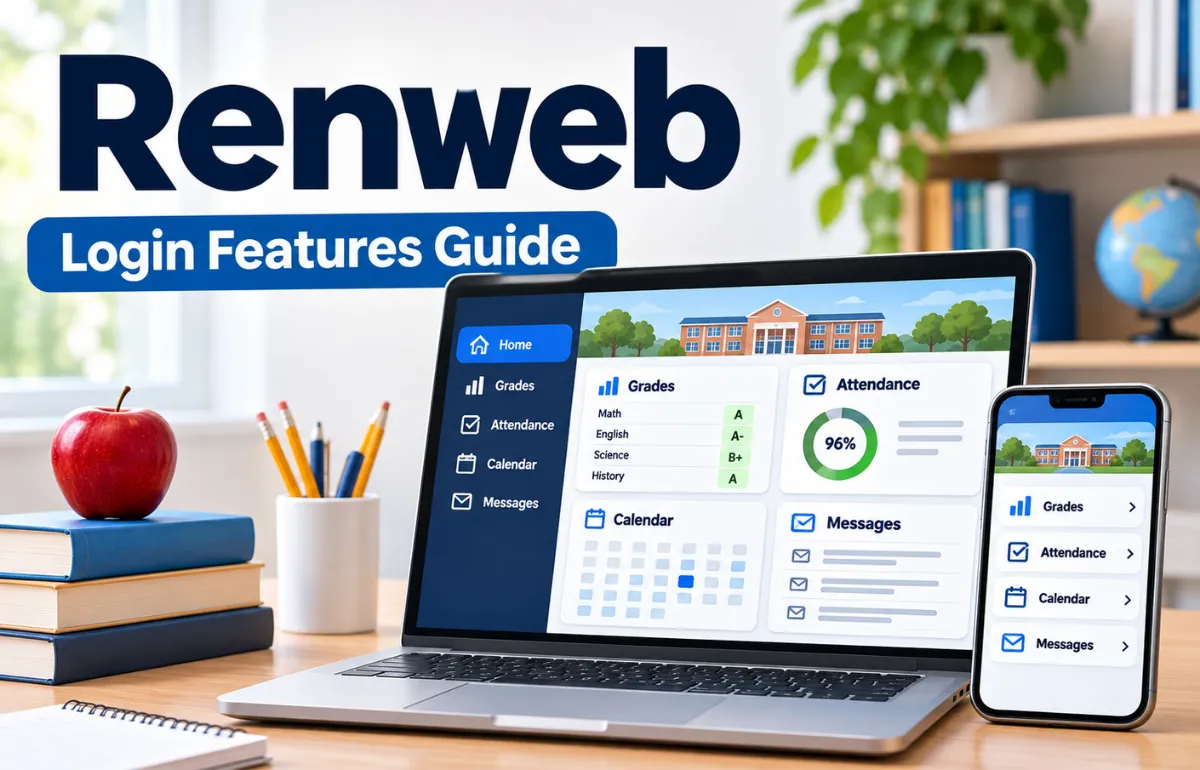
RenWeb, officially known today as FACTS Student Information System (SIS), is a cloud-based school management platform that helps educational institutions manage student records, grades, attendance, enrollment, tuition payments, and communication. It connects teachers, parents, students, and school administrators through a centralized digital system, making academic and administrative information easier to access and organize.
Instead of relying on paperwork, spreadsheets, and separate communication channels, schools can manage many of their daily activities through a connected platform.
Parents can monitor their children’s academic performance, teachers can maintain digital gradebooks, and students can stay informed about assignments and class schedules.
While researching the platform, I noticed that much of the confusion surrounding it comes from its name change and different login options. I’ll explain how the system works, what makes it useful, and how to get more value from its features.
What Is RenWeb?
RenWeb is an educational technology solution designed to simplify academic management and school administration. It primarily serves K-12 educational institutions, including private schools, Christian schools, and independent academies.
The software brings academic records, administrative responsibilities, financial services, and family communication into a connected digital environment.
As a cloud-based solution, it allows authorized users to access school information through internet-connected devices without storing everything on a local computer.
I consider its biggest strength to be the connection it creates between classroom activities and school operations. Information that once required a telephone call or a visit to the school office can often be accessed within minutes.
Is RenWeb Now Called FACTS?
Yes, RenWeb is now called FACTS Student Information System. FACTS acquired RenWeb in 2014, and the software was officially renamed FACTS SIS in 2018.
The original parent portal, known as ParentsWeb, also became the FACTS Family Portal.
Although the branding changed, many schools continue to use the original name on their websites, parent handbooks, and enrollment instructions. This explains why people searching for RenWeb login frequently encounter FACTS-branded pages.
The following table explains the relationship between the different names.
| Previous Name | Current Name or Alternative | Primary Purpose |
|---|---|---|
| RenWeb | FACTS SIS | School administration and student management |
| ParentsWeb | FACTS Family Portal | Parent and student access |
| RenWeb Home | FACTS Family App or school-branded app | Mobile access to school information |
| RenWeb teacher portal | FACTS SIS staff access | Classroom and academic management |
These names generally refer to different parts or generations of the same educational technology ecosystem rather than completely unrelated platforms.
How Does RenWeb Work?
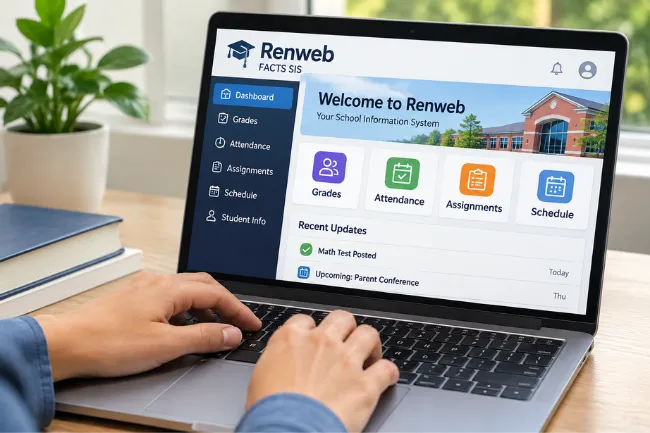
The platform operates through a centralized student database maintained by the school.
Administrators create student profiles, configure academic terms, establish grading policies, and manage user permissions. Teachers contribute information through attendance records, assessments, and classroom updates.
Parents and students can then access the information their school makes available through the family portal.
For example, imagine a teacher records the results of a mathematics test on Friday morning. Once those grades become available to families, a parent can review the results without waiting for the next parent-teacher conference.
However, information visibility depends on the school’s publishing policies. A grade entered by a teacher may not immediately appear in the parent portal.
Understanding this distinction helps prevent unnecessary confusion about missing or delayed academic updates.
Key Features of RenWeb
The platform provides several tools that support everyday educational activities. Here are the features I consider particularly valuable.
Student Information Management
Schools can maintain organized student profiles containing enrollment details, academic history, contact information, emergency contacts, and other relevant records.
Centralized data reduces the need to maintain duplicate records across different departments. Authorized staff can retrieve information when needed, while access permissions help restrict sensitive details.
Online Gradebook
Teachers can record assignment results, examination scores, homework grades, and overall academic performance through a digital gradebook.
Depending on school settings, parents and students can review individual grades, report cards, and academic progress.
This creates an opportunity to identify learning difficulties before they develop into more significant problems.
Attendance Tracking
The attendance management feature allows schools to record absences, late arrivals, and other attendance-related information.
Parents may also receive notifications about attendance concerns when their school enables the relevant communication features.
Consistent attendance records can help educators identify patterns that deserve additional attention.
School Communication
Effective communication plays a major role in a student’s educational experience.
Through connected communication tools, schools can distribute announcements, classroom updates, event reminders, and emergency messages.
Instead of searching through multiple email conversations, families can access relevant information through their school’s designated communication channels.
Tuition and Payment Management
Schools using connected FACTS financial services can provide families with convenient access to tuition balances, payment schedules, and eligible school expenses.
However, financial management features depend on the services adopted by each institution.
Some schools may use the academic platform without integrating all available payment options.
Admissions and Enrollment
Online enrollment tools help schools collect applications, process registration information, and organize student records.
Families can complete enrollment or re-enrollment requirements digitally when their institution enables these services.
This reduces repetitive paperwork and makes the transition between academic years more manageable.
How to Access the RenWeb Login Portal
Accessing the platform is relatively straightforward, provided you have the correct school information.
How to Log In as a Parent or Student
To access your account:
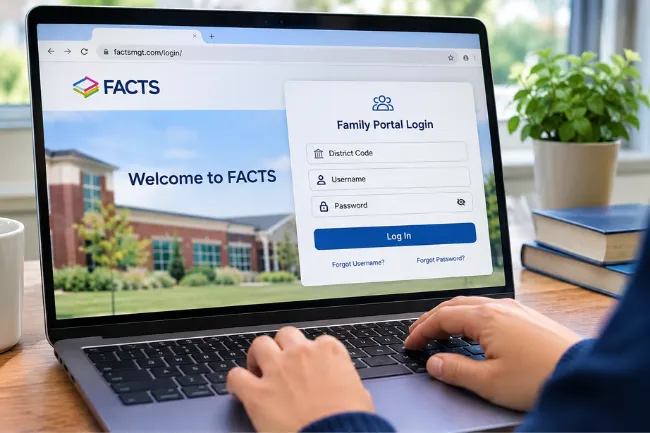
- Visit the official website at https://factsmgt.com/login/.
- Select the appropriate region.
- Choose Family Portal Login.
- Enter your school’s district code when requested.
- Follow the prompts for your account type.
- Enter your login credentials or use your school’s approved sign-in method.
Once authenticated, you should be able to access your personalized dashboard.
I recommend bookmarking the official login page rather than repeatedly searching for it. This reduces the risk of visiting unofficial websites that imitate legitimate educational portals.
How to Create a New Account
First-time users generally need to register using the email address already recorded by their school.
Open the family portal and look for the account creation option. Provide the requested school code and registered email address, then follow the verification instructions sent to your inbox.
Create your username and password if required by the registration process.
If registration fails, contact the school office to confirm that your email address is correctly associated with your student or family record.
What Is a RenWeb District Code?
A district code is a school-specific identifier that directs users to the appropriate institution within the FACTS system.
Without the correct code, your login credentials may not connect you to your school’s records.
You can usually obtain this information from your school’s website, enrollment documents, welcome emails, or administrative office.
RenWeb for Parents: Getting More From the Family Portal
The parent portal offers more than convenient access to report cards.
Used thoughtfully, it can help families understand academic development, recognize emerging difficulties, and maintain productive communication with educators.
Monitor Academic Progress Without Micromanaging
I recommend reviewing academic performance at consistent intervals rather than checking grades several times a day.
For instance, a weekly review can help parents identify missing assignments, falling grades, or subjects that require additional support.
Children also benefit from having enough independence to manage their academic responsibilities without feeling constantly monitored.
Create a Ten-Minute Weekly Review
One practical approach I would suggest is setting aside ten minutes each weekend to review school information.
Spend the first few minutes checking attendance and upcoming events. Review incomplete assignments next, then discuss any academic concerns with your child.
This simple routine turns the family portal into a planning tool instead of another source of notifications and pressure.
Understand Missing Assignments Before Reacting
A missing assignment does not always mean a student failed to complete their work.
The teacher may still be reviewing submissions, an absence may have affected the deadline, or a completed assignment might not have been recorded yet.
Before assuming the worst, check the available details and ask the teacher for clarification when necessary.
How RenWeb Supports Students
Students can benefit from having direct access to their educational information.
Depending on the school’s configuration, they can review assignment deadlines, academic results, class schedules, and announcements.
This encourages students to take greater responsibility for their learning.
I particularly like the idea of using the student portal as a weekly planning resource. Rather than relying entirely on reminders from parents or teachers, students can identify upcoming responsibilities and organize their study time accordingly.
The platform can support independence, although it should complement good study habits rather than replace them.
Benefits of RenWeb for Teachers
Teachers often balance classroom instruction with a considerable amount of administrative work. Digital school management software can make these responsibilities easier to organize.
Educators can maintain attendance records, record assessment results, review student information, and communicate with families.
Digital academic records can also support more informed parent-teacher discussions.
For example, instead of describing a student’s difficulties in general terms, a teacher can reference specific assignments, attendance patterns, and assessment results.
The quality of these insights ultimately depends on how consistently teachers maintain their records.
RenWeb for School Administrators
For administrators, the platform provides a central environment for coordinating academic and operational responsibilities.
School leaders can organize student information, oversee enrollment, generate reports, manage academic schedules, and control staff access.
The ability to connect information across departments may also reduce unnecessary administrative duplication.
When evaluating any school information system, I would look beyond the number of features. Data accuracy, staff training, user permissions, and long-term maintenance are equally significant.
Even sophisticated software becomes less effective when records are outdated or responsibilities are poorly defined.
RenWeb vs. Traditional School Management
The differences between digital school management and conventional administrative practices become particularly noticeable in schools handling large amounts of information.
| Feature | RenWeb / FACTS SIS | Traditional School Management |
|---|---|---|
| Student records | Centralized digital database | Paper files or separate spreadsheets |
| Grade access | Online when published | Printed reports or direct inquiries |
| Attendance | Digital tracking | Manual attendance registers |
| Parent communication | Connected communication tools | Letters, calls, and meetings |
| Enrollment | Online forms when enabled | Primarily manual documentation |
| Reporting | Digital report generation | Manual compilation |
| Accessibility | Remote access for authorized users | Often limited to school premises |
Digital management offers considerable convenience, but it still requires reliable infrastructure and responsible information management.
Traditional methods may also remain useful as backup procedures during technical interruptions.
Is There a RenWeb Mobile App?
Families can access supported school information through the FACTS Family App or a customized school-branded mobile application.
Available features may include academic updates, announcements, school calendars, attendance information, and payment services.
The exact experience varies between institutions because schools can customize the mobile features they offer.
I suggest checking your school’s official website before downloading an application. Your institution may recommend a specific app rather than an older RenWeb-branded product.
Families who prefer not to install additional applications can generally access the browser-based family portal instead.
Common RenWeb Login Problems and Their Solutions
Technical difficulties can occasionally interrupt access to the school portal. Fortunately, many common problems have straightforward solutions.
Incorrect District Code
Confirm your school’s district code with the administrative office.
Be particularly careful when copying codes containing letters, numbers, or hyphens.
Forgotten Username or Password
Use the account recovery option displayed on the login page and follow the verification instructions.
Check your spam or junk folder if the recovery email does not arrive.
Account Registration Failure
Make sure the email address you entered matches the one registered with your school.
If you recently changed your email address, ask the school to update its records.
Dashboard Not Loading
Try refreshing the page, updating your browser, clearing cached website data, or accessing the portal through another device.
If several users experience the same problem, there may be a wider service interruption.
Grades or Student Information Not Showing
Confirm that you are using the correct account, student profile, and academic term.
Some information may remain unavailable until the school publishes it or updates your access permissions.
Is RenWeb Safe and Secure?
FACTS provides security and privacy measures intended to protect educational records and restrict unauthorized access.
However, protecting student information is a shared responsibility between the software provider, educational institutions, and individual users.
I recommend creating a strong, unique password, enabling additional authentication options when available, and avoiding shared login credentials.
Parents should also avoid sharing screenshots containing student identification details, grades, medical information, or personal contact records on public platforms.
If a suspicious email requests your password or financial details, access the official website directly instead of following the email’s links.
Practical Ways Schools Can Improve Their RenWeb Experience
Purchasing educational technology is only one part of building an effective digital school environment.
How an institution manages its implementation often determines whether the platform becomes genuinely useful.
Establish Clear Data Ownership
Schools should assign specific responsibilities for maintaining student records, attendance information, financial details, and family contact records.
This helps prevent conflicting information between departments and makes corrections easier to manage.
Create an Academic Update Schedule
Schools can reduce confusion by communicating when grades, attendance records, and report cards are typically updated.
When families know what to expect, they are less likely to misinterpret temporary gaps in information.
Conduct a Termly Family Information Check
I would encourage schools to remind families to verify contact details, emergency contacts, and authorized pickup information at the beginning of each academic term.
Even a well-designed student database loses its value when essential information becomes outdated.
Measure Adoption Rather Than Account Creation
The number of registered users does not necessarily indicate successful implementation.
Schools should also consider whether families regularly access relevant information, whether teachers maintain accurate records, and whether administrative inquiries are becoming easier to resolve.
These indicators provide a more meaningful picture of how effectively the technology supports the school community.
What Are the Disadvantages of RenWeb?
Despite its benefits, the platform has limitations worth considering.
New users may require time to understand its navigation and features. Staff members also need adequate training to maintain records consistently.
Internet connectivity problems can interrupt access, while differences in school configuration mean families may not receive the same experience at every institution.
Additionally, some services may involve separate costs or subscription arrangements.
I recommend that schools evaluate their actual requirements before adopting additional features. Paying for capabilities that staff rarely use does not necessarily improve educational outcomes.
Is RenWeb Worth Using in 2026?
For educational institutions seeking a connected school management system, FACTS SIS remains a relevant option in 2026.
Its ability to bring administrative responsibilities, academic information, and family engagement into a connected environment makes it particularly useful for schools looking to reduce fragmented processes.
However, its suitability depends on institutional requirements, available budgets, staff readiness, and existing technology.
For parents and students whose schools already use the platform, learning its core features is worthwhile. A few minutes spent understanding the dashboard can make everyday academic planning considerably easier.
Conclusion
RenWeb has evolved into a broader educational management solution under the FACTS brand. It continues to help schools organize information, support teachers, improve family communication, and simplify academic administration.
What I find most valuable about the platform is its potential to turn scattered school information into something accessible and actionable.
Technology alone cannot improve education, but thoughtful use of reliable information can support better decisions.
If your school uses FACTS SIS, visit the official family portal, verify your account information, and explore the features available to you. Start with grades, attendance, and upcoming school activities before moving on to additional tools.
Frequently Asked Questions
Is RenWeb the same as FACTS?
Yes. RenWeb was renamed FACTS Student Information System in 2018, while its former ParentsWeb portal became the FACTS Family Portal.
How do I find my RenWeb district code?
You can obtain your district code from your school’s official website, enrollment documents, welcome emails, or administrative office.
Is RenWeb free for parents?
Browser-based family portal access is generally provided through participating schools, although mobile applications and additional services may involve fees.
Can parents check grades on RenWeb?
Yes, parents can review grades, assignments, attendance, and report cards when their school makes this information available through the family portal.
Why is my RenWeb account not working?
Common reasons include incorrect login credentials, an invalid district code, account restrictions, browser problems, or temporary service interruptions.

Noah Sterling is a technology research writer with 8+ years of experience covering emerging technologies, software trends, digital tools, and innovation. He creates practical, research-based articles to help readers understand the evolving technology landscape.