
The phrase ext intitle refers to two advanced search concepts used to narrow online search results: ext: looks for a particular filename extension, while intitle: focuses on words in a webpage’s title. Together, they can help someone search for a specific type of page discussing a specific subject. However, ext intitle by itself is not a complete search command. Each operator needs a value, and support varies between Google and Bing.
For example, ext:asp intitle:cart is intended to find pages with an .asp extension and “cart” in their titles. That sounds straightforward, but the results can be incomplete or misleading. I find it more useful to understand what each part actually asks the search engine to do than to copy a query without knowing its limitations.
What Does Ext Intitle Mean?
Think of a search engine as a library with billions of items. An ordinary search asks for books about a topic. Advanced operators add conditions, such as a specific format or a word in the title.
The expression has two separate pieces. ext is short for extension, referring to the characters at the end of a filename, such as .pdf or .asp. intitle means “in the title,” referring to text associated with the page’s title rather than simply any word in its body.
The colon matters. In an operator such as ext:pdf, the text after the colon supplies the extension. In intitle:report, it supplies the title term. Typing only ext intitle usually leaves the search engine with two ordinary words, not a properly defined pair of filters.
What Does the Ext Operator Do?
Microsoft documents ext: as a Bing keyword that restricts results to webpages with a specified filename extension. For instance, ext:pdf targets PDF filenames, while ext:asp targets addresses ending with the Classic ASP extension.
An extension is a clue about a URL, not a complete description of the technology behind it. A page ending in .asp may run server-side code, while another website might use clean URLs that reveal no extension at all.
What Does Intitle Do?
The commonly used intitle: syntax asks a search engine to match a term in the page title. A query such as intitle:pricing aims to surface pages titled with “pricing.” The title usually comes from the HTML title element, although the headline displayed in search results can differ.
Title matching is useful for finding specific topics, but it cannot guarantee that the page actually contains the information you need. A headline is a label, not proof of content quality, freshness, or accuracy.
Does Ext Intitle Work on Google and Bing?

This is where many explanations become too casual. Google and Bing are different search engines; they do not promise identical behavior for every operator.
Microsoft’s Bing advanced search keywords explicitly include ext: and filetype:. Its documentation also describes searching title metadata, though the keyword list’s title-operator formatting is unusual. In practice, intitle: is a familiar query form, but I would verify its current behavior before building a repeatable Bing workflow around it.
Google’s Search Central operator documentation formally documents filetype: and site:. It does not list ext: as a supported Google equivalent, and its current public help pages do not explicitly document intitle:. An undocumented operator may still affect some searches, but that is different from a guaranteed feature.
| Search feature | Bing | |
|---|---|---|
| ext: | Not listed in current official operator documentation | Explicitly documented |
| filetype: | Documented for file types or extensions | Documented |
| intitle: | Widely used; not in current public operator list | Commonly used; verify current behavior |
| site: | Documented for a site or URL prefix | Documented for sites and domains |
| Quotation marks | Documented for exact phrases | Documented for exact phrases |
My rule is simple: start with the operators the chosen search engine documents, then treat other combinations as experiments rather than guarantees. For Google, filetype: is usually the more defensible starting point when looking for a particular extension.
How to Build a More Precise Search Query
I prefer starting with a broad, harmless subject and narrowing it only when I know what I want to find. That makes mistakes easier to spot.
Start With a Title Term
Try intitle:guide if you want pages whose titles mention a guide. Or search for intitle:pricing when comparing public pricing pages. Remember that you are expressing a preference for a title match, not asking the engine to assess whether a page is helpful.
Add an Extension or File Type
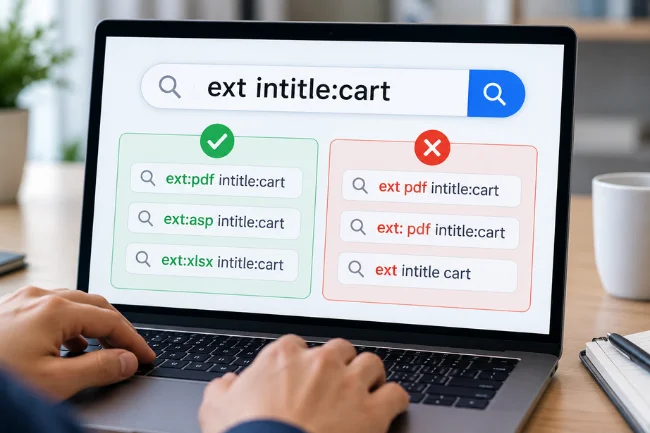
In Bing, an example such as ext:pdf intitle:report is intended to find PDF documents with “report” in their titles. For Google, try filetype:pdf "annual report" instead. That combination uses officially documented file-type and exact-phrase features.
Limit the Search to a Website You Control
When auditing a website, I recommend adding site: to make the scope clear. For example:
site:example.com filetype:pdf "product manual"
This asks Google to look for matching material associated with one example domain. Replace that illustrative domain with a website you own or are authorized to review. If no results appear, do not immediately conclude that the documents are missing.
Compare Two Queries, Not Just One
A useful habit is to run a broad query first and record what appears, then apply one additional filter. If results disappear, you can identify which condition caused the change.
This one-change-at-a-time approach is often more revealing than stacking five operators into a single search and wondering why the result page is empty.
Why Do People Search for Ext Intitle?

One variation frequently associated with ext intitle is ext:asp intitle:cart. It combines a filename extension linked with Classic Active Server Pages and a title term commonly used by online stores.
Classic ASP is a server-side technology associated with Microsoft’s Internet Information Services (IIS). An .asp page can generate dynamic content, including customer-facing interfaces. Microsoft says Classic ASP remains supported on supported IIS versions, with its support lifecycle tied to the host operating system.
The word “cart” could appear in titles such as “Shopping Cart,” “Cart Summary,” or “Your Cart.” Those labels make a page relevant to an e-commerce search. They do not tell you whether checkout works, whether a store is active, or whether a customer session is secure.
Crucially, finding an ASP shopping cart in a search index does not establish a vulnerability. The extension alone does not disclose the application’s patch status, authentication controls, or server configuration. I would never label a website unsafe based only on an indexed URL and its title.
For legitimate website research, a safer variation is to restrict the query to a property you manage and then review the relevant pages through your normal administrative tools.
What Search Results Can—and Cannot—Prove
The biggest mistake with advanced queries is treating a search result as a direct inventory of everything on the internet. Search engines crawl pages, decide what to index, and choose which results to display. Each stage introduces limitations.
Google specifically warns that site: results may not include every indexed URL. Its Search Central guidance also says Search Console’s URL Inspection tool is more reliable for debugging an individual page than search operators alone.
I use a three-question check when interpreting any filtered result:
- Syntax: Does the operator have the correct form for this search engine?
- Indexing: Could the page be absent because it was never indexed, was removed, or is excluded from results?
- Context: Does the actual page support the conclusion suggested by its title and URL?
If any answer is uncertain, I treat the result as a lead to verify, not a fact to publish. This distinction matters when researching old software, comparing business documents, or auditing a website.
Practical Uses for SEO and Website Management
Advanced search operators can save time for digital marketers, editors, and site owners. Their strongest use is discovery: spotting pages worth checking more carefully.
Find Outdated Titles and Older Files
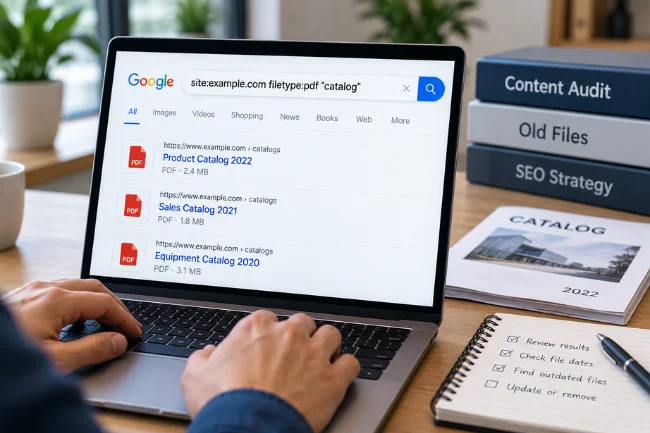
Suppose I manage a website with hundreds of downloadable brochures. A query such as site:example.com filetype:pdf "catalog" can help surface documents that might still appear publicly. I would compare those hits with the current document library and identify obsolete material.
For ordinary webpages, title-oriented searches can point toward old product names, outdated services, or repeated headings. They are a useful starting signal, but dedicated crawling tools and a content inventory are better for exhaustive audits.
Investigate Pages That Should Not Appear in Search
Shopping carts, account pages, test environments, and internal previews often deserve closer inspection. Some need to be publicly accessible; others should not appear in search results at all.
An indexed URL is not automatically a privacy incident. Still, if a page contains personal data or information intended only for signed-in users, the right response is to review access controls immediately—not merely edit its SEO title.
Check Indexing With Search Console
For a Google property I manage, I would move from a search query to the URL Inspection tool. That can help establish whether Google knows the exact URL, which canonical page it selected, and whether indexing is allowed.
Google’s own guidance on the site: operator explains why search results should not be treated as a comprehensive count of indexed pages. The page indexing reports and website records provide stronger diagnostic evidence.
Advanced Search Operators Worth Knowing
| Operator or syntax | Main purpose | Example |
|---|---|---|
| site: | Restrict results to a domain | site:example.com policy |
| filetype: | Look for a document type | filetype:pdf gardening |
| ext: | Filter filename extensions in Bing | ext:docx proposal |
| intitle: | Target a term in a page title where recognized | intitle:recipes |
| “phrase” | Search an exact phrase | “annual sustainability report” |
| -term | Exclude a term in Google | jaguar -car |
The key distinction is between an extension and a content type. The extension is part of a filename or URL; a content type is information a server sends about the resource. Google’s filetype: documentation says matching can use the HTTP content-type header or the extension. That is why a simple filename assumption can sometimes mislead you.
Common Ext Intitle Mistakes and How to Avoid Them
Leaving Out the Colon or Value
ext intitle is an explanation of two concepts, not a properly completed operator query. Write the intended values after each colon, without a separating space: ext:pdf, not ext: pdf.
Assuming Every Search Engine Behaves Alike
A query copied from a Bing tutorial may not work in Google. Check the search engine’s current documentation, and translate the intention where possible. For extension-based Google searches, filetype: is a better documented option than ext:.
Adding Too Many Filters
Combining extension, title, exact phrase, date, and domain filters can unintentionally eliminate useful pages. Add conditions individually, and keep a record of which variation changes the results.
Treating a Search Snippet as a Live Page
A snippet may reflect an older crawl or a different piece of content than you expected. Titles can change, URLs can redirect, and pages can disappear. Visit an authorized page directly or inspect it through the property’s tools before drawing conclusions.
Confusing Discovery With Security Testing
Search operators help locate indexed information. They do not assess encryption, permissions, session handling, or software vulnerabilities. Those questions require an authorized security review with an agreed scope and appropriate tools.
Keeping Sensitive or Unwanted Pages Out of Search
If I discovered that a private page from my own website was appearing in results, my first question would be whether the page should be accessible without a login. Search visibility is a separate problem from access security.
For publicly reachable pages that should not be indexed, a noindex robots directive may be appropriate. Google supports placing it in an HTML meta tag or an HTTP response header. However, the crawler must be allowed to access the page to read the directive. Blocking the URL with robots.txt can prevent Google from seeing its noindex instruction.
A password-protected page needs authentication regardless of indexing settings. A noindex directive is not a substitute for protecting customer details, orders, or administrative information.
I would also review sitemap entries, internal links, and canonical URLs, and then request a new inspection when changes are made. For urgent exposure of sensitive information, the priority is securing or removing the content at its source; search removal tools can assist but cannot undo every copy.
A Simple Framework for More Reliable Searches
Rather than collecting increasingly elaborate search strings, I use a practical framework: define, restrict, verify, record.
First, define the exact information you want: a file format, a document title, or a set of pages on your own site. Second, restrict the search using an operator the engine supports. Third, verify any important finding against the actual page or an authoritative administrative tool.
Finally, record the search engine, query, date, and result URL. A query that appears useful today may behave differently after the index changes. Keeping that small research log makes your conclusions easier to explain and reproduce.
Frequently Asked Questions
What is ext intitle in Google search?
It refers to extension and title-focused search syntax, but ext intitle alone is not a complete Google command. Google officially documents filetype: for file-type searches.
What does ext intitle mean?
It is intended to find indexed .asp pages with “cart” in their titles. The results do not, by themselves, identify insecure websites.
Is ext: the same as filetype:?
Not exactly. Bing documents both; Google documents filetype:, which can use either the filename extension or HTTP content type.
Why does my intitle search show no results?
The term may be absent from indexed titles, the search may be too restrictive, or the engine may interpret the operator differently. Try fewer filters.
Is using advanced search operators legal?
Ordinary public searching is generally legitimate, but authorization still matters. Do not use search findings to access protected accounts, data, or systems without permission.
Final Thoughts
Ext intitle is best understood as a way of thinking about two search filters, not as a magical command. Once you separate filename extensions from title matching, it becomes easier to choose appropriate operators, recognize their limitations, and avoid misleading results.
Start with a documented query on a site you manage, compare it with a broader search, and verify what you find. That small habit will make your research more useful than any long list of unexplained search tricks.

Noah Sterling is a technology research writer with 8+ years of experience covering emerging technologies, software trends, digital tools, and innovation. He creates practical, research-based articles to help readers understand the evolving technology landscape.