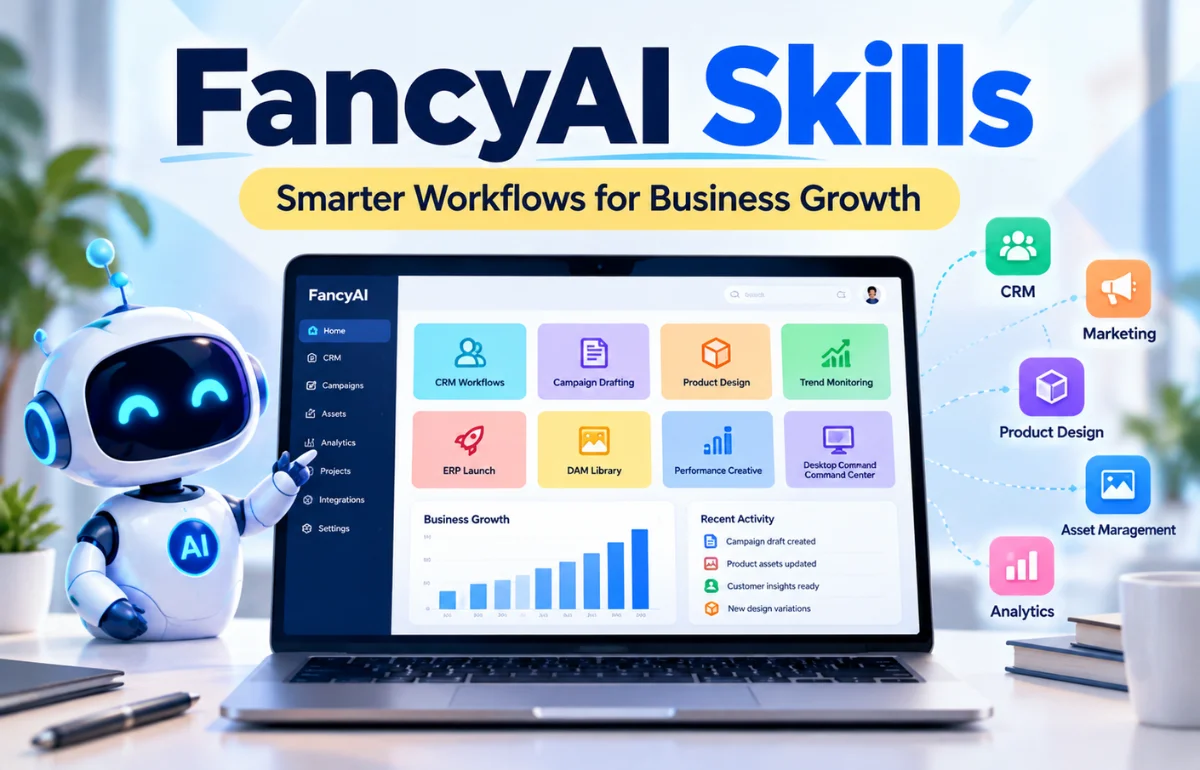
FancyAI Skills are specialized AI capabilities designed to help businesses complete specific jobs, such as preparing marketing campaigns, analyzing customer activity, creating product-launch materials, organizing brand assets, and developing advertising content. Rather than treating AI as a separate chatbot, FancyAI aims to connect these capabilities with existing tools and business information. Its desktop offering lists eight workflow-oriented skills, including CRM Workflows, ERP Launch, and Campaign Drafting.
The idea is practical: customer details already live in a CRM, product specifications sit in an ERP, and approved images belong in a digital asset library. A connected AI workflow can use that context instead of asking someone to assemble it manually for every task.
I see the appeal, but I also think buyers should separate what the company advertises from what they have personally verified. Here’s what FancyAI says its skills do, where they fit, and what I would check before relying on them for everyday work.
What Are FancyAI Skills, Exactly?
A skill is a focused capability for a repeatable task. Campaign Drafting, for instance, is about creating briefs and copy directions. CRM Workflows is about using customer information to identify opportunities for re-engagement. Both involve AI, but their inputs, outputs, and business goals differ.
This is a meaningful distinction from opening a general-purpose chatbot, typing a request, and copying the result somewhere else. In a connected workflow, the relevant data and tools may already be available to the system. That can reduce retyping and help a team maintain consistency.
FancyAI also describes AI Experts and API-based products. I wouldn’t treat those terms as interchangeable. An AI Expert is positioned as a specialized agent, an individual skill describes a capability or workflow, and an API gives developers a way to connect functionality to other software. The company’s product overview separates its AI Experts API offering from its desktop app.
Access, permissions, and integration configuration may vary, so a feature list alone cannot establish what your organization can use immediately.
The Eight FancyAI Skills at a Glance
The official FancyAI desktop page currently describes the following eight capabilities. This table translates the product descriptions into everyday business tasks.
| Skill | Main purpose | Useful starting information | Example output or action |
|---|---|---|---|
| CRM Workflows | Support customer retention | Purchase and interaction history | Re-engagement campaign draft |
| ERP Launch | Prepare new-product launches | Inventory and product specifications | Product sheets and launch assets |
| DAM Library | Find and reuse brand-approved assets | Existing image and design library | Relevant approved creative files |
| Campaign Drafting | Develop marketing materials | Product details and campaign goals | Briefs, landing-page copy, ad variations |
| Performance Creative | Build on effective ads | Historical creative results | New ad concepts and variations |
| Trend Monitoring | Turn emerging topics into content | Social signals and brand guidelines | Captions, visuals, content ideas |
| Product Design | Explore design directions | Sales patterns and design references | Concept and pattern variations |
| Desktop Command Center | Coordinate connected work | Files, tools, systems, and agents | A more unified workflow |
These are intended capabilities, not independently measured results. I would ask for a demonstration with relevant business data.
How the Individual Skills Work in Practice

CRM Workflows: Turning Customer Records Into Useful Follow-Ups
Customer relationship management software often contains a great deal of information that sales teams don’t have time to examine manually. FancyAI positions CRM Workflows around customer behavior, churn signals, and personalized re-engagement content.
Imagine a subscription business with customers who have stopped renewing. Instead of exporting a spreadsheet and starting a campaign from scratch, a connected workflow could help identify a suitable audience and draft messages based on their history.
Before sending, I would check consent, audience rules, and record accuracy. A persuasive message sent to the wrong person is not a productivity win.
ERP Launch: Moving From Product Data to Marketing Materials
An enterprise resource planning system, or ERP, holds information such as product identifiers, stock records, specifications, and sometimes pricing. FancyAI describes ERP Launch as a way to turn new product entries into launch assets and product information materials.
For a retailer adding dozens of items each week, that could remove a familiar bottleneck: the product exists in inventory before its descriptions, imagery, and marketing assets are ready.
Someone must still check prices, dimensions, availability, and product claims. Faster generation can also spread existing errors faster.
DAM Library: Finding the Right Brand Assets
DAM stands for digital asset management. Businesses use these libraries to store approved images, logos, videos, templates, and other creative files. FancyAI’s DAM Library skill focuses on searching, organizing, and reusing those assets.
This may sound less exciting than generating a new image, but I consider it one of the more practical use cases. A campaign can lose time because a designer chooses an outdated logo or a marketer cannot locate the approved product photo.
AI-assisted search cannot reliably fix a poorly maintained library. Clear ownership and file permissions still matter.
Campaign Drafting: Getting Beyond the Blank Page
Campaign Drafting is aimed at marketing briefs, copy angles, landing-page sections, and advertising variations. Think of it as support for producing a first workable draft, not a substitute for knowing your audience.
If I were planning a campaign for a new running shoe, I would start with the product’s verified features, the intended buyer, the offer, and the desired action. I would then assess the suggested headlines against those details rather than choosing whichever one sounded most dramatic.
Speed matters only when the final message is accurate, distinctive, and on-brand.
Performance Creative: Learning From Existing Ads

FancyAI describes Performance Creative as a way to use successful advertising hooks and results to develop fresh creative variations. It is especially relevant to teams running paid campaigns on social platforms.
Suppose a retailer has several ads with different opening lines. A variation based on the strongest performer may be a sensible test, provided the team understands which metric matters: clicks, leads, purchases, or profit.
A higher click-through rate does not necessarily mean better results. Test against a defined goal and check conversion quality.
Trend Monitoring: Acting on Relevant Social Signals
Trend Monitoring aims to spot emerging social topics and turn them into brand-appropriate content ideas, captions, and visuals. For social media managers, timing can matter almost as much as the creative idea itself.
Yet chasing every trend is a poor content strategy. I would use three filters before approving a suggestion: Does the topic fit the audience? Can the brand contribute something useful? Is there enough time to check the facts and context?
A thoughtful response to one relevant trend can be worth more than ten forced posts.
Product Design: Exploring Concepts With Business Context
Product Design connects design exploration with references such as sales patterns, popular styles, and existing creative assets. FancyAI describes using this information to iterate on silhouettes, patterns, and visual directions.
For a fashion or accessories team, a generated concept might help compare colorways or discuss a product direction before committing to expensive samples. That is an ideation benefit, not a guarantee that the result is manufacturable.
Teams must still check materials, sizing, intellectual property, costs, and manufacturability.
Desktop Command Center: Bringing the Pieces Together
The Desktop Command Center is the coordinating layer in FancyAI’s described workflow. Its purpose is to bring files, connected tools, business systems, and AI agents into one workspace.
Its value depends on what happens before and after a draft: sourcing product details, selecting approved imagery, obtaining sign-off, and publishing. Disconnected steps still create manual work.
For me, the central question is whether the complete workflow becomes easier to manage, not how many AI features appear on the screen.
Which Business Tools Can FancyAI Connect With?
FancyAI’s desktop site lists connectors or integration categories including Salesforce, HubSpot, ERP systems, DAM libraries, Meta Ads, TikTok Ads, Instagram, Slack, Gmail, Google Drive, Notion, and Canva. These are vendor-listed connections; the public list alone does not establish the depth, permissions, or availability of every integration.
| Connection group | Examples named by FancyAI | What I would verify |
|---|---|---|
| Customer and product systems | Salesforce, HubSpot, ERP systems | Which records can be read or changed? |
| Creative and file tools | DAM Library, Google Drive, Canva | Can it find approved assets and respect access controls? |
| Advertising and social channels | Meta Ads, TikTok Ads, Instagram | Can it draft, publish, or only suggest content? |
| Communication and coordination | Slack, Gmail, Notion | Who approves actions and sees the results? |
A listed connector does not guarantee every action is supported. Ask for a demonstration before depending on it.
How to Get Started Without Overcomplicating It
FancyAI promotes a desktop download that detects the operating system, alongside offerings aimed at API users and organizations needing deeper implementation support. I haven’t independently tested a complete enterprise deployment, so I won’t invent installation screens or promise a one-click CRM connection.
I would approach a first trial with a tightly defined business task:
- Choose one workflow. For example, draft product-launch copy from a verified product record. Avoid launching five experiments at once.
- Identify the source of truth. Decide which product database, customer system, or asset library contains the correct information.
- Check access and permissions. Determine what the skill can read, what it can modify, and who can approve publishing or sending.
- Test with limited data. Use a suitable sample or test environment before exposing sensitive customer records.
- Review the output. Check accuracy, brand tone, missing details, and unsupported claims.
- Measure the result. Compare the total time and quality against the same task completed through your existing process.
A two-minute draft isn’t faster if it needs forty minutes of corrections. Count rework time.
FancyAI Skills Pricing: What Is Confirmed?

The public FancyAI pricing page describes usage-based credits for access to models through its gateway. It displays example credit amounts of $10, $25, $50, and $100, along with a custom amount option. The page also says gateway balances do not expire and that a subscription is not required for that particular pay-as-you-go arrangement.
I would not automatically present those amounts as a complete price list for FancyAI’s desktop skills, enterprise integrations, or custom deployments. The public information reviewed does not clearly establish a separate price for each of the eight workflows.
Before paying, ask which skills are included, what consumes credits, whether connectors cost extra, and whether user limits or enterprise agreements apply.
Are FancyAI Skills Secure and Reliable Enough for Business?

Connecting AI with internal business systems changes the risk compared with asking a public chatbot to rewrite a paragraph. Customer histories, unpublished products, financial details, and licensed creative assets may all be involved.
FancyAI promotes a desktop experience that works with local files, but I would not treat a marketing statement about local workflows as a complete security assessment. Data handling can depend on the particular model, connector, settings, and deployment arrangement.
My evaluation checklist would include:
- Where prompts, source files, and generated outputs are processed and stored.
- Whether business data is used for model training and what controls apply.
- How access is limited by user role, connected account, or folder permission.
- Whether publishing, customer messaging, and record changes require human approval.
- What logs, deletion options, and contractual protections are available.
These are due-diligence questions, not verified defects. Regulated businesses should involve IT and compliance staff before connecting live data.
Reliability deserves the same scrutiny. A skill might produce fluent content while misunderstanding a product specification or selecting an outdated asset. Put factual checks and a clear approval process around anything customer-facing.
Who Is Most Likely to Benefit?
I see the strongest potential fit where a company repeats similar work at meaningful volume and already maintains useful business data. E-commerce retailers with frequent product launches, marketing agencies handling many campaigns, and teams managing large creative libraries are natural examples.
The fit is less obvious for a small organization that launches a few products annually, has inconsistent records, or needs only occasional writing help. In that situation, a simpler tool and a better-organized process may be enough.
Match system complexity to a real problem. More automation isn’t automatically more value.
A Simple Way to Judge Whether a Skill Is Worth Using
I would evaluate each task against three criteria: frequency, data readiness, and review effort.
Frequency: Does the team perform the task every day or only twice a year? Repetitive work creates more room for savings.
Data readiness: Are the customer records, specifications, or approved assets accurate enough to support the task? Poor data will undermine automation.
Review effort: Can a qualified employee check the output quickly, or does every result demand extensive correction?
Here’s a simple calculation. Imagine a team completes 40 product listings each month. If a new workflow saves a net 12 minutes per listing after review, that represents eight hours saved monthly. The example is hypothetical, but the method is useful: measure net time saved, then compare it with subscription or credit costs, setup effort, and error risk.
Track quality too, such as corrections per listing. Savings that reduce accuracy rarely last.
Frequently Asked Questions
What are FancyAI Skills used for?
They are designed for business workflows such as CRM follow-ups, campaign drafting, product launches, asset management, ad creative, trend monitoring, and product design.
How many FancyAI Skills are available?
FancyAI’s desktop page currently lists eight named workflow capabilities, including the Desktop Command Center. The lineup may change as the platform develops.
Are FancyAI Skills free?
FancyAI advertises pay-as-you-go model gateway credits, but that page does not clearly confirm the full cost or free-access terms of every desktop skill.
Do I need coding skills to use FancyAI?
The desktop offering is presented as a workspace for teams, while API products serve developers. Specific integrations may still require technical setup or administrator help.
Can FancyAI Skills replace a marketing team?
They can assist with drafting, analysis, and repetitive preparation. People remain responsible for strategy, factual accuracy, approvals, customer relationships, and final decisions.
Final Thoughts
FancyAI Skills are most interesting when they connect specialized AI work to reliable company information. The eight advertised capabilities cover a useful range, from customer follow-ups to product design, but their real value depends on integrations, good data, and careful human review.
If you’re considering the platform, start with the official desktop feature list, choose one measurable task, and request a demonstration using your actual workflow. That will tell you far more than a long list of promises.

Noah Sterling is a technology research writer with 8+ years of experience covering emerging technologies, software trends, digital tools, and innovation. He creates practical, research-based articles to help readers understand the evolving technology landscape.