Publix Oasis is the workforce scheduling and labor-management system associated with Publix employees. In practical terms, associates commonly use the Publix employee environment to check work schedules, see assigned shifts, and manage work-related scheduling information, while managers use Oasis-related tools to help plan staffing and labor needs.
There is one distinction I want to make immediately: Publix Oasis and Publix PASSport are closely connected terms, but they are not necessarily interchangeable. Publix’s current public materials refer associates to PASSport for employee self-service functions, while employees continue to use the name Oasis when discussing scheduling. Recent employee discussions in 2026 still refer to both Passport and Oasis when talking about schedule access and system availability.
That difference matters because many search results make Publix Oasis sound like a normal public website or standalone mobile app. It is better understood as part of Publix’s internal workforce ecosystem rather than a service intended for Publix shoppers.
What Is Publix Oasis?
Publix Oasis is generally described as an internal scheduling and workforce-management system used within Publix Super Markets.
Its purpose is broader than simply displaying a calendar. Scheduling software in a large retail organization has to balance associate availability, department coverage, projected workload, operating hours, job roles, and labor requirements.
For an associate, however, the experience is much simpler: the main concern is usually, “When do I work?”
That is why searches such as “Publix Oasis schedule,” “Publix employee schedule,” “Publix Oasis login,” and “Publix Passport schedule” frequently describe essentially the same user journey.
Employee discussions also show that Oasis remains an active term inside Publix. In 2025 and 2026, associates have discussed Oasis in connection with staffing roles, schedules, availability, and system downtime. These discussions are anecdotal rather than official Publix documentation, but they help explain how employees actually use the terminology.
Publix Oasis vs. Publix PASSport: What Is the Difference?
This is probably the most confusing part of the topic.
I found many online articles that use “Publix Oasis,” “Publix Passport,” and “Publix Oasis Passport” as if all three names refer to one product. That oversimplifies how the systems are discussed.
A more useful way to understand them is this:
Publix itself publicly confirms the use of PASSport for current associates. For example, an official Publix retirement and stockholder form instructs current associates to log in to PASSport when updating certain information. Publix’s careers website also tells current associates that retail transfer opportunities can be found in PASSport.
Oasis is more commonly encountered when employees specifically talk about scheduling.
I therefore think of PASSport as the broader employee doorway and Oasis as part of the scheduling/workforce side of the experience. Exact screen names and navigation can change over time, so employees should rely on what appears in their authenticated Publix account rather than instructions copied from an old blog post.
What Can Employees Use Publix Oasis For?
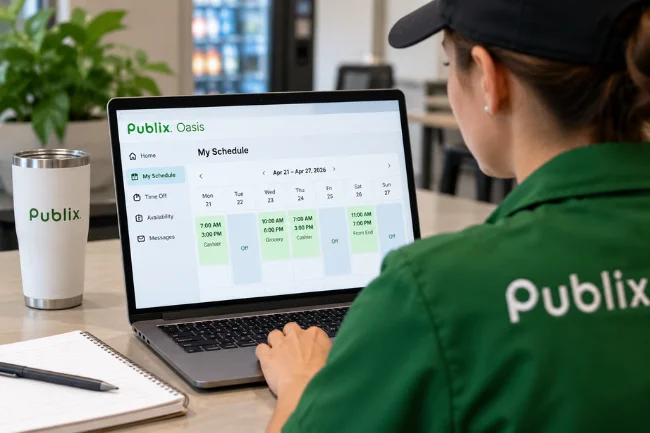
Viewing Work Schedules
Checking an upcoming work schedule is the main reason most people search for Publix Oasis.
Retail schedules can vary significantly from week to week, particularly for part-time associates. A cashier, grocery clerk, bakery associate, deli worker, or other store employee may not always work identical hours.
Online schedule access gives employees a way to review assigned shifts without depending solely on a printed schedule at their workplace.
Current employee discussions in 2026 continue to describe schedules being viewed through Passport and refer to Oasis when discussing the scheduling system itself.
Managing Availability
Availability tells management when an associate can reasonably be scheduled.
For students, parents, people with second jobs, or associates with other recurring responsibilities, accurate availability is especially important.
One thing I would not assume, however, is that entering availability automatically guarantees every future schedule will perfectly match an employee’s preferences. Scheduling still involves operational requirements, staffing levels, approved availability, and manager decisions.
If a posted schedule conflicts with previously approved availability, the safest approach is to speak directly with the appropriate manager rather than assuming the software will correct it automatically.
Reviewing Schedule Changes
A digital schedule also makes it easier to see whether shifts have changed.
This matters because employees often plan transportation, classes, appointments, childcare, and personal commitments around their published schedule.
My practical advice is simple: once a schedule becomes available, review it carefully rather than relying on memory.
Some Publix employees even recommend keeping a personal record of a published schedule because employee systems may occasionally be unavailable during maintenance or other outages. Employee reports from August 2026, for example, described temporary Passport schedule-access problems and referred to Oasis downtime.
Supporting Store Staffing
The employee-facing schedule is only one side of Oasis.
From a workforce-management perspective, scheduling systems help managers match available labor with expected business needs.
A supermarket does not need the same number or type of employees at every hour. Customer traffic, truck deliveries, production work, opening duties, closing duties, department-specific tasks, and seasonal demand all affect staffing requirements.
Employee discussions about Oasis describe scheduling roles and suggested staffing periods based on operational needs. Because these details come from employee reports rather than public technical documentation from Publix, I would treat the exact algorithms and internal rules as subject to change.
How to Access Publix Oasis in 2026
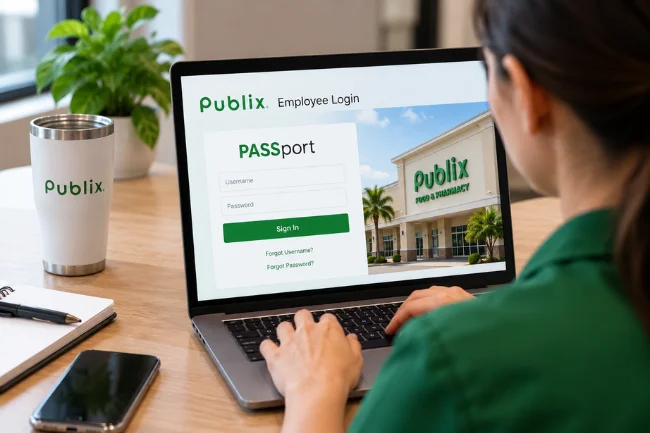
The safest starting point is an official Publix employee resource, not a website that merely has “Publix,” “Oasis,” or “Passport” in its domain name.
Publix publicly confirms that current associates use PASSport for employee self-service tasks.
Once authenticated, employees can use the options made available to their account to reach relevant scheduling or employee tools.
I deliberately recommend this approach rather than publishing a list of unofficial “Publix Oasis login” URLs. While researching this article, I found several independent websites with domain names that closely resemble an official Publix employee portal.
That creates unnecessary confusion.
A domain containing the words “Publix Passport” does not automatically mean Publix owns it.
Use Your Own Employee Credentials
Publix employee services are not public accounts that anyone can create.
Access depends on employment credentials and the security requirements associated with the employee account.
Never give another website your Publix employee username, password, verification code, or other authentication information simply because the page appears in Google for “Publix Oasis login.”
Complete Any Required Security Verification
Employee portals contain information that should be protected, including employment and potentially financial or personal records.
If the authentication process asks you to complete an approved verification method, follow the instructions presented through the legitimate Publix sign-in process.
Do not approve an unexpected authentication request that you did not initiate.
Does Publix Have a Publix Oasis App?
I could not verify a publicly distributed standalone employee app officially named “Publix Oasis” in Publix Super Markets’ current Google Play developer listing.
That is worth highlighting because numerous third-party pages claim there is a Publix Oasis mobile app.
Publix does have an official consumer app, but its current Google Play description focuses on shopping features such as weekly ads, digital coupons, orders, shopping lists, Club Publix savings, and product searches. It is not described as the employee Oasis scheduling application.
So if you search an app store for “Publix Oasis” and find something unfamiliar, do not assume it is legitimate.
Use employee access methods provided directly by Publix.
Publix Oasis vs. the Regular Publix App
The similarity in names can cause unnecessary confusion, particularly for new associates.
The regular Publix app is useful if you want to shop, clip coupons, check weekly deals, create shopping lists, or order food.
It should not be confused with Publix Oasis or PASSport.
Why Is Publix Oasis or PASSport Not Working?
Employee portals occasionally fail to load properly, and the cause is not always the employee’s account.
Here are the problems I would check first.
The System May Be Temporarily Unavailable
Maintenance, server issues, unusually high traffic, or an internal outage can temporarily affect schedule access.
Employee reports have described periods when schedules in Passport could not be viewed and Oasis appeared unavailable. Such discussions are not official outage announcements, but they show that temporary access problems do occur.
If everything worked previously and suddenly stops, avoid repeatedly changing account settings before determining whether the problem is temporary.
Your Credentials May Be Incorrect
A mistyped password or username can obviously prevent access.
Check for accidental spaces, incorrect capitalization, autofill mistakes, and old saved passwords.
If a password must be reset, use the password-recovery process supplied through the official employee system rather than an independent website offering to “recover” your Publix login.
Browser Data May Be Causing Trouble
Old cookies or cached sessions sometimes interfere with modern authentication systems.
Closing and reopening the browser may help. You can also try an updated browser or another device if company policy allows it.
Be cautious about clearing everything indiscriminately on a shared or work device because doing so may remove other stored sessions or settings.
You May Be Using the Wrong Website
I consider this one of the most overlooked problems.
Search engines return many independent pages about Publix Oasis and PASSport. Some contain useful explanations, but that does not make them official employee portals.
Instead of trusting a page because its domain sounds convincing, verify that you are entering credentials only through an authorized Publix system.
How Publix Oasis Scheduling Works Behind the Scenes
Employees sometimes talk about Oasis as though a computer completely decides everybody’s schedule.
The reality appears more nuanced.
Workforce-management software can calculate staffing requirements and help identify when particular roles or labor hours are needed. Managers then operate within those staffing requirements and business conditions.
Employee accounts of Publix scheduling describe automated or system-generated scheduling components alongside managerial adjustments.
That distinction explains something employees sometimes find confusing: software may suggest an “ideal” staffing pattern, but real stores operate with actual human beings who have vacations, school schedules, illnesses, training requirements, different skills, and availability restrictions.
A mathematically efficient schedule is not automatically a practical schedule.
That is why conversations with managers remain important even when sophisticated scheduling software is involved.
Practical Ways to Use Your Publix Schedule More Effectively
After reviewing employee portal systems over the years, I have found that most scheduling problems become harder when people treat the online calendar as something to check only once.
I would use it as an active planning tool.
Review your schedule shortly after it is published. Compare it with school, transportation, appointments, childcare, or other work commitments.
If something appears incorrect, raise the issue early rather than waiting until shortly before the shift.
It is also sensible to keep a personal record of important work times. A calendar entry or saved reference can be useful when you are planning the rest of your week.
Still, your personal copy should not become an excuse to ignore legitimate schedule updates. Check the authenticated employee system again when necessary and follow Publix’s workplace procedures for schedule communication.
Security Matters More Than Convenience
The biggest risk around searches for Publix Oasis is not forgetting what time you work.
It is entering employee credentials on the wrong website.
While researching this article, I encountered multiple independent domains built around phrases such as Publix Passport and Publix Oasis. Some clearly identify themselves as informational websites, but searchers may not notice that distinction when they simply want to check tomorrow’s shift.
My rule is straightforward: informational blogs can help explain a system, but they should not become the place where you submit private employment credentials.
Also avoid sharing screenshots containing employee IDs, personal information, QR codes, authentication prompts, payroll details, or other sensitive information publicly.
Publix treats employee and HR-related information as sensitive information within its corporate security policies, which reinforces the need to protect account access carefully.
What Former Publix Employees Should Know
Former employees should not assume that every feature available during active employment will remain accessible indefinitely.
PASSport is primarily discussed by Publix as a resource for current associates. Publix’s own retirement and stock-account documentation, for example, distinguishes between procedures for current Publix associates and non-Publix associates.
If you have left Publix and need tax, retirement, stock, employment, or benefits information, use the official contact or document process appropriate to former employees rather than repeatedly trying an old employee login.
The correct route depends on what information you need.
Is Publix Oasis Still Relevant in 2026?
Yes, the term is still relevant, but the way people search for it needs context.
Publix’s public-facing employee references emphasize PASSport, while recent associate conversations still use Oasis when discussing schedules and workforce scheduling.
For that reason, I would not describe Oasis as a dead or completely replaced term.
At the same time, I would not tell readers that “Publix Oasis” is a standalone public website or consumer application. Available evidence supports a more precise explanation: Oasis remains associated with Publix’s scheduling environment, while PASSport serves as an important employee self-service access point.
That wording reflects how the terminology is actually being used in 2026 without turning assumptions about a private internal system into facts.
Frequently Asked Questions
What is Publix Oasis?
Publix Oasis is the workforce scheduling system associated with Publix employees, particularly for work schedules, staffing, and related labor-management functions.
How do I check my Publix Oasis schedule?
Current associates should begin with the official Publix employee/PASSport access provided by Publix and open the available scheduling tools after securely signing in.
Is Publix Oasis the same as Publix PASSport?
Not exactly. PASSport is the broader employee self-service environment, while Oasis is commonly associated specifically with workforce scheduling and labor management.
Is there an official Publix Oasis mobile app?
I could not verify a publicly listed standalone Publix app named “Publix Oasis.” The regular Publix mobile app is primarily a customer shopping and Club Publix application.
Why can’t I see my Publix schedule?
The employee system may be temporarily unavailable, your login session may have expired, or there may be an account or browser issue. If the problem continues, use Publix’s official employee support route or contact your manager.
Final Takeaway
Publix Oasis is best understood as part of the workforce scheduling environment used to help Publix associates and managers organize store labor and employee schedules. For employees, its most recognizable purpose is simple: knowing when they are expected to work.
The key point in 2026 is understanding the relationship between Oasis and PASSport. Publix’s public materials clearly recognize PASSport as an employee self-service resource, while current employees continue to refer to Oasis when discussing scheduling.
If you are a Publix associate trying to check a shift, start with the official employee access information supplied by Publix rather than a look-alike website found through search. Once signed in, rely on the current options shown in your account, protect your login details, and speak with your manager when a scheduling issue cannot be resolved through the system.

Ethan Caldwell is a business research writer with 9+ years of experience covering entrepreneurship, market trends, business strategies, and industry insights. He focuses on creating clear, data-informed articles that help readers understand modern business concepts.