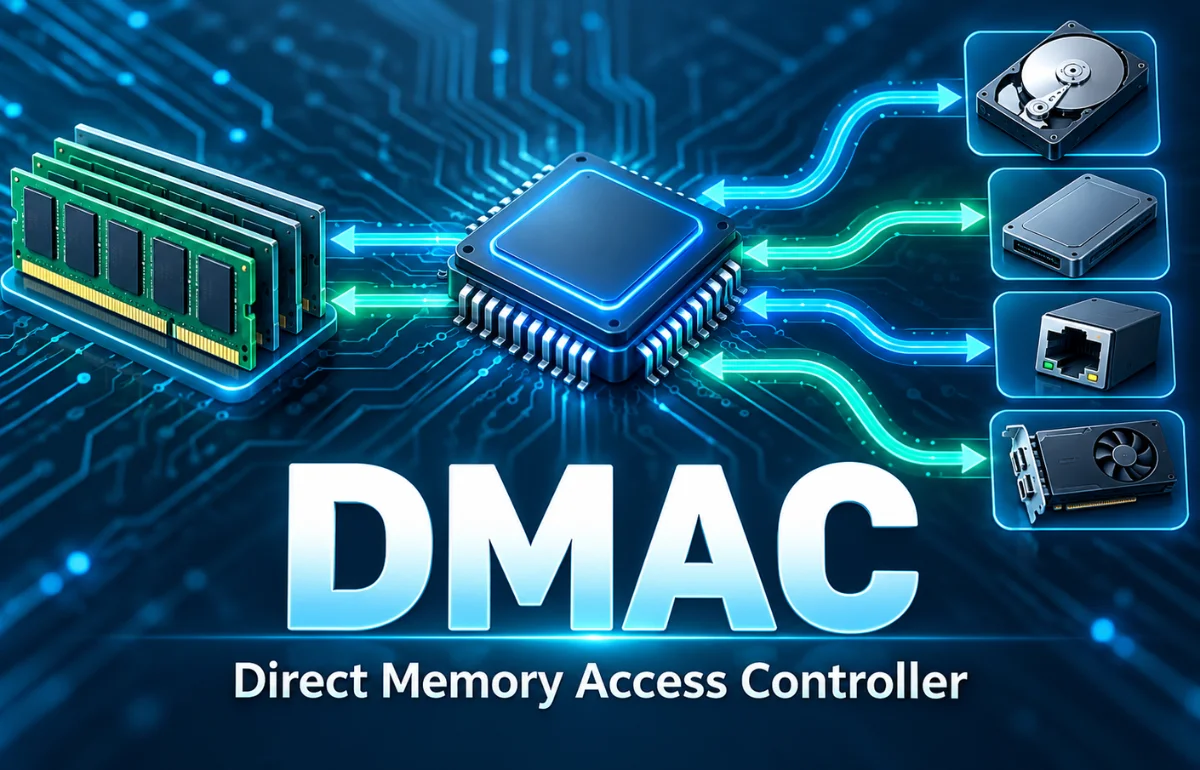
DMAC stands for Direct Memory Access Controller, a hardware component that transfers data between memory and input/output devices, or between memory locations, with little intervention from the central processing unit (CPU). Instead of making the processor copy every piece of data itself, software configures a transfer and the controller carries out the movement. This is useful when a system is continuously collecting sensor readings, playing audio, or handling large streams of information.
DMAC and DMA are closely connected, but they are not identical. DMA is the technique called direct memory access; the DMAC is the controller that implements it. I find this distinction the easiest place to start because it explains both the technology and its purpose. The exact features depend on the hardware, but the central idea remains the same: move data efficiently while leaving the processor available for other work.
What Is DMAC in Computer Architecture?
A processor can copy data by reading it from one address and writing it to another. That approach works, but repeated transfers consume CPU instructions and memory-bus capacity. When a device needs to exchange data frequently, the processor may spend substantial time moving bytes rather than processing them.
A DMAC takes over much of that repetitive movement. After initialization, it accesses the appropriate source and destination through the system’s memory and peripheral interconnects. Depending on the design, the controller may operate with several channels, each assigned to a different transfer.
Think of a CPU as a kitchen chef and a DMAC as a delivery conveyor. The chef decides what needs to move and where it belongs; the conveyor performs the transport. The chef still supervises the operation, but does not have to carry every item by hand.
How Does a DMAC Work?
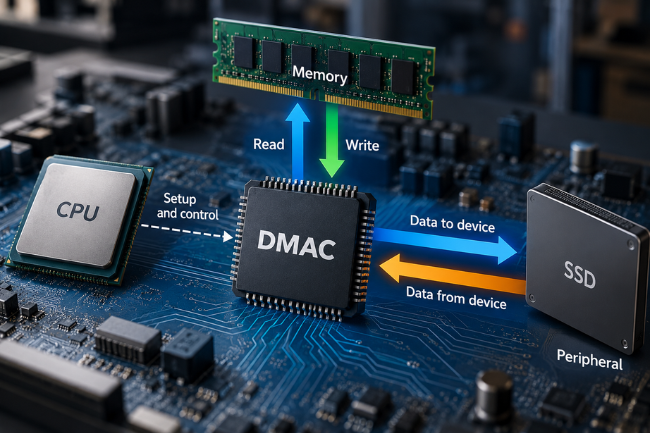
A DMA operation usually follows a predictable sequence. The program identifies the data source, its destination, and the amount of information to transfer. The controller then responds to a software request or a signal from a peripheral, depending on its capabilities.
1. Software prepares the transfer
The CPU or device driver sets up control registers or a transfer descriptor. These instructions tell the controller where the data begins, where it should go, how many units to move, and whether the addresses should change after each unit.
For example, a microcontroller receiving readings from an analog-to-digital converter (ADC) might use a fixed peripheral register as the source and a series of RAM addresses as the destination. The source stays in place, while the memory destination advances as readings arrive.
2. A trigger starts the movement
Some transfers start immediately when software requests them. Others begin when a UART, SPI interface, ADC, or other peripheral signals that data is ready. A hardware trigger helps match the transfer to the device’s pace without requiring the CPU to check constantly.
If several DMA channels request access simultaneously, an arbiter determines which request proceeds. Priorities and fairness rules vary by controller. A high-priority stream may receive faster service, although it can also delay less urgent transfers.
3. The controller moves the data
Once granted access, the DMAC reads the source and writes the destination. The smallest unit is often called a beat; several beats may make up a block, and multiple blocks can form a larger transaction.
Some designs support linked descriptors, allowing several transfers to run in sequence. Circular buffering can reuse memory regions for continuous data streams without reprogramming each block manually.
4. Completion or an error is reported
When the programmed operation finishes, the controller updates status information and may generate an interrupt. Software can also check a completion flag, although frequent polling may cancel part of the CPU-efficiency benefit.
Main Components of a DMAC
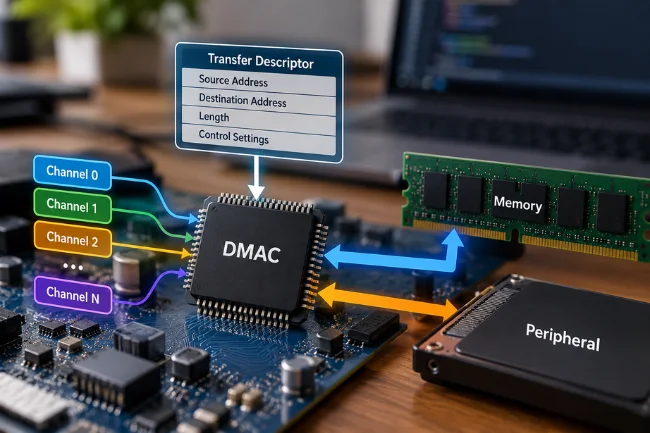
Understanding a few internal elements makes hardware documentation much easier to read.
DMA channels and transfer descriptors
A channel is a configurable path for one stream of data movement. A descriptor defines the operation’s details, including source address, destination address, length, and control settings. Some devices use register-based programming, while others read descriptors from RAM.
The number of channels is not universal. For instance, Microchip documents 12 channels for certain SAM D21 devices, but different chip families provide different resources. Never assume that a programming example written for one microcontroller will work unchanged on another.
Triggers, arbiter, and bus access
A trigger tells the channel when to request a transfer. The arbiter settles competing requests, and the bus interface connects the controller to memory or peripheral registers.
The system bus is shared infrastructure, not unlimited bandwidth. If the CPU and controller both need the same memory at once, one may have to wait. This is why a transfer can reduce CPU workload without necessarily reducing overall memory traffic.
Status flags and interrupts
Status flags reveal whether a channel is idle, running, finished, or experiencing an error. Interrupts let software respond when attention is genuinely needed rather than checking after every transferred value.
Types of Data Transfers Supported by DMAC
Not all controllers support every route, but four patterns appear frequently in microcontrollers and system-on-chip designs.
| Transfer type | Typical example | Why it helps |
|---|---|---|
| Peripheral to memory | ADC samples stored in RAM | Captures incoming data with fewer CPU instructions |
| Memory to peripheral | Audio samples sent to a digital-to-analog converter | Feeds an output device at a steady rate |
| Memory to memory | Copying a block between RAM buffers | Offloads repetitive copying when the block is large enough |
| Peripheral to peripheral | Moving data between compatible hardware interfaces | Reduces intermediate software handling when supported |
One caution: a controller may support a route in principle while a particular peripheral lacks the necessary DMA request connection. The chip’s DMA request map matters as much as the controller’s feature list.
DMAC vs. DMA vs. CPU-Controlled Data Transfer
The terms get mixed together, especially in introductory explanations. DMA describes a method. DMAC describes hardware. Programmed input/output and interrupt-driven input/output describe other ways software can move data.
| Approach | Who performs routine movement? | CPU involvement | Best suited to |
|---|---|---|---|
| Programmed I/O | CPU instructions | High during transfers | Simple or very small transfers |
| Interrupt-driven I/O | CPU, inside interrupt handlers | Periodic handling for each event or group | Modest traffic that needs timely response |
| DMA using a DMAC | Dedicated transfer hardware | Setup, completion, and coordination | Repeated streams and suitably large blocks |
Interrupt-driven I/O and DMA are not mutually exclusive. A typical DMA-based design still uses an interrupt when a buffer is half full or a transfer ends. The difference is that software is notified after meaningful progress instead of being responsible for copying each data unit.
I also avoid treating DMA as a synonym for zero-copy. DMA can remove CPU-managed copying, but some pipelines still require intermediate buffers or later copies because of hardware access restrictions, data formats, or software design.
Benefits of Using a Direct Memory Access Controller
More CPU time for useful work
The clearest benefit is that the processor does not have to execute a copy instruction for every unit moved. In an embedded application, the saved processing time can be used for calculations, control decisions, communication protocols, or other tasks.
Predictable handling of continuous streams
Audio, sampling, and serial communication all become harder when data arrives continuously. With a carefully configured DMA channel and buffer, a system can move incoming values at the required rate without running a CPU interrupt for every byte.
Predictability still depends on bus contention, interrupt response, buffer size, and peripheral timing. The controller helps, but it does not eliminate deadlines.
Potential energy savings
On some microcontrollers, peripheral-triggered DMA continues while the CPU sleeps. Microchip describes this behavior for supported SAM devices, where ADC activity can trigger transfers to SRAM without waking the processor for each sample.
Energy savings are workload-specific, however. If setup overhead or bus activity dominates a tiny task, DMA may deliver little benefit.
Where Is DMAC Used in Real Systems?
Sensor acquisition and industrial control
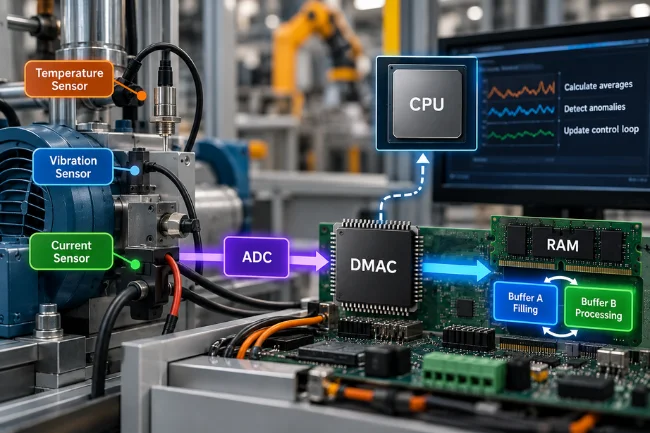
Imagine a machine sampling temperature, vibration, or motor-current data. The ADC produces a stream of readings, and the DMAC deposits them into RAM. Meanwhile, the CPU can calculate averages, detect unusual values, or update a control loop.
With a double-buffer arrangement, one memory region receives new samples while the other is processed. This separation helps prevent the analysis routine from blocking data collection.
Audio playback and recording
An audio system must supply or collect samples steadily. DMA can transfer prepared samples to an audio peripheral at the appropriate pace, then notify software when part of the buffer is available for refilling.
Serial communication and connected devices
UART and SPI peripherals often exchange bursts or continuous blocks of data. A DMAC can move received bytes into memory or send prepared bytes from a buffer. This is useful for connected sensors, displays, and embedded communication modules.
Larger platforms also use DMA-capable hardware in networking, storage, and other high-throughput interfaces. The underlying idea is similar, even though their controllers may be integrated into specialized devices rather than exposed as one general-purpose DMAC.
How to Configure DMAC Safely in Firmware
A vendor library may hide register details, but the engineering decisions remain. I recommend understanding these areas before copying an example project into a real application.
Confirm addresses, direction, and transfer size
First, identify whether each endpoint is RAM or a peripheral register. Check the data width, alignment requirements, transfer count, and address-increment settings. A fixed register address is common for peripheral access; incrementing addresses are typical for a RAM buffer.
Plan who owns each buffer
A buffer should not be modified by the CPU while hardware is reading it unless the design explicitly supports that interaction. Likewise, the CPU should not process a receiving buffer before the expected data has arrived.
I think of this as a handoff contract: software prepares and releases the buffer, hardware uses it, then software reclaims it after a clear completion event. Double buffering, ring buffers, and completion flags make that contract easier to enforce.
Handle cache coherency and memory visibility
On cache-equipped systems, the CPU and a DMA-capable device may see different versions of a buffer unless the architecture provides coherent access or software performs the required synchronization.
The Linux kernel’s DMA mapping documentation distinguishes coherent and streaming mappings and explains why cache-line alignment and synchronization matter. On a bare-metal microcontroller, follow the chip manufacturer’s equivalent cache-maintenance rules.
Also distinguish cache coherency from memory ordering. Even with coherent memory, the program may need barriers so a descriptor is fully written before hardware is told it is ready.
Build error handling into the design
What happens if the destination cannot be accessed, a transfer is aborted, or the peripheral overruns its buffer? Production firmware needs a defined response, not just a successful-demo path.
Track transfer completion, error flags, and buffer indexes. If a channel fails, stop or reset it using the documented sequence, preserve useful diagnostic information, and restart only when the peripheral and memory are in a known state.
When DMAC May Be Slower Than a CPU Copy
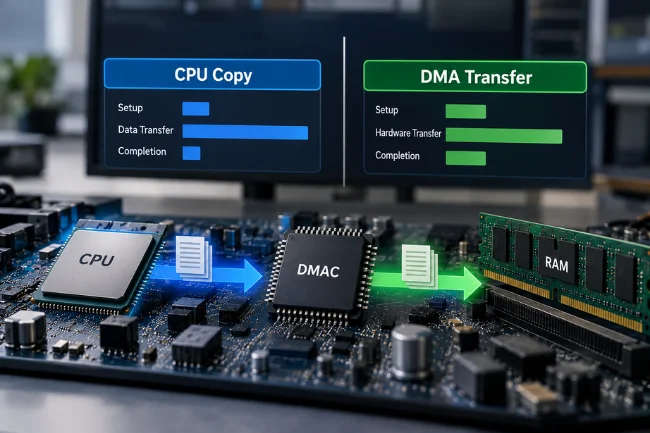
DMA is not a free shortcut. The CPU must configure the transfer, and the system may need to map memory, manage caches, wait for completion, or handle an interrupt. For a very small block, these fixed costs can outweigh the time saved by offloading the copy.
Here is the practical comparison I use when evaluating a design:
CPU-copy time is roughly the time spent moving the block directly. DMA path time includes setup, hardware movement, and whatever synchronization the application requires. These are conceptual components, not a universal benchmark formula.
A fast controller may still be the wrong choice if the application must wait immediately for every tiny transfer. Conversely, it can be valuable even when the wall-clock transfer time is similar, because the CPU can perform something else concurrently.
To evaluate a real workload, measure transfer latency, CPU busy time, memory-bus contention, and energy use separately. A single throughput figure misses the trade-off between finishing one transfer quickly and keeping the whole system productive.
Common DMAC Problems and How to Recognize Them
A transfer that produces the same value repeatedly may have an incorrect address-increment setting. Corrupted or shifted results can indicate an unsuitable transfer width, alignment problem, or buffer overlap. Missing values can point to a peripheral overrun, late processing, or insufficient buffer capacity.
Stale data deserves particular attention. If the DMA status says complete but the CPU still reads old values, investigate cache synchronization and memory ownership before assuming the controller failed.
Timing problems can also be deceptive. Giving every channel maximum priority does not create more bus bandwidth. A busy high-priority channel can make another transfer late, so priorities should reflect actual deadlines rather than a general desire for speed.
What Else Can DMAC Mean?
The acronym has more than one legitimate expansion, which is why context matters in search results. In chemistry, DMAC or DMAc can refer to N, N-dimethylacetamide, an industrial solvent; it is unrelated to computer memory transfers. In education, DMAC can mean Data Management for Assessment and Curriculum, a software platform used by educators in Texas.
Other uses include Digital Media and Analytics Centre, an education organization in Pakistan, and the term destination MAC in networking documentation, where it refers to the destination media access control address. If the surrounding text mentions solvents, student assessments, training courses, or Ethernet frames, the computing-controller definition may not be intended.
Final Thoughts
DMAC is most useful when moving data is necessary but having the CPU move every piece is wasteful. Its value comes from coordinated transfers, appropriate buffering, and a clear understanding of the hardware’s limits—not from a promise of automatic speed.
If you’re designing or troubleshooting a system, begin with the chip’s DMAC reference manual, identify the transfer route, and test one controlled buffer operation before adding more channels. That small experiment will reveal far more than a headline performance claim.
Frequently Asked Questions About DMAC
What is the full form of DMAC in computers?
DMAC stands for Direct Memory Access Controller, the hardware that manages certain data transfers with minimal CPU involvement.
Is DMAC the same as DMA?
No. DMA is the data-transfer technique, while a DMAC is a hardware controller used to perform it.
Does DMAC make a computer faster?
It can improve overall efficiency by freeing CPU time, especially for repeated or large transfers, but the result depends on the workload and system design.
Can DMAC transfer data without the CPU?
After software configures it, a DMAC can move supported data autonomously; the CPU may still manage setup, synchronization, and errors.
What is the difference between DMAC and an interrupt?
A DMAC moves the data; an interrupt alerts software to an event. They are often used together when a transfer finishes or a buffer needs attention.

Noah Sterling is a technology research writer with 8+ years of experience covering emerging technologies, software trends, digital tools, and innovation. He creates practical, research-based articles to help readers understand the evolving technology landscape.