Anon Vault is a privacy-focused digital storage service designed to let people upload, store, and share files with less personal information and more control over encryption. Instead of treating a provider’s server as a trusted place where staff can read everything, the model aims to encrypt files before they leave the user’s device and keep the decryption key with the user. It may also use distributed storage, expiring links, multi-factor authentication, and tamper-evident activity records.
That sounds attractive, especially when ordinary cloud accounts collect identity details and store huge amounts of information in one place. Still, a privacy label does not automatically prove that a service is private. In this guide, I explain how Anon Vault is supposed to work, where its security can help, which limits deserve attention, and what I would check before trusting it with sensitive data.
What Is Anon Vault?
Anon Vault is generally described as anonymous or identity-minimizing cloud storage. The central idea is simple: users should be able to protect files without handing over more personal information than the service needs. That can reduce the amount of identity data exposed in a breach.
The security model combines several layers. Files may be encrypted on the client device, stored as encrypted fragments across more than one node, and opened only after the correct authentication checks. A zero-knowledge design aims to prevent the operator from reading the content, while expiring links can limit how long a shared file remains available.
These features address different problems. Encryption protects the content. Distributed storage reduces dependence on one server. Access controls protect the account. Anonymous signup reduces identity exposure. A strong service needs all of these layers to work together; one attractive feature cannot compensate for a weak key-management system or a compromised device.
How Anon Vault’s Privacy Model Works
Client-side and end-to-end encryption
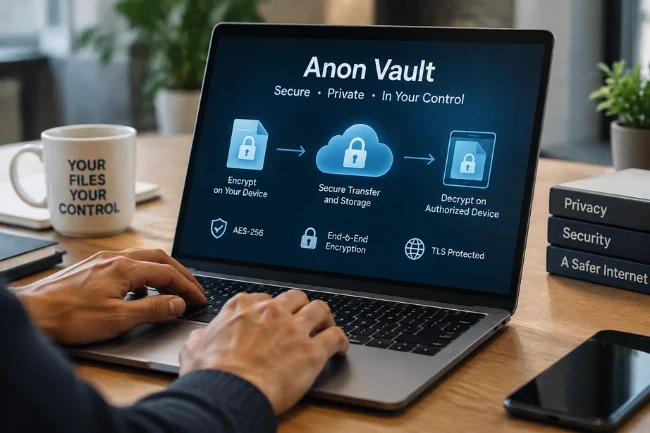
The most useful question is where encryption starts. With client-side encryption, the file is converted into ciphertext on your device before it is uploaded. The storage provider receives an unreadable version rather than a plain document, image, or video.
End-to-end encryption extends that protection across the file’s journey. Data remains encrypted during transfer and while stored, then is decrypted on an authorized device. AES-256 is often mentioned in descriptions of secure storage. AES-256 refers to the length of the encryption key; it is a strong standard when implemented correctly, but the label alone does not prove that the whole product is secure.
Transport protection still matters. TLS protects the connection between your device and the service, but it does not protect a laptop infected with malware. It also cannot stop an approved recipient from downloading, photographing, or forwarding a file.
Zero-knowledge architecture
A zero-knowledge storage design means the provider is not supposed to possess the keys needed to read your file content. That reduces the damage from an employee abusing access, a server compromise, or a legal request for readable files.
There is a trade-off. If the provider cannot decrypt your files, it may also be unable to reset a lost key or restore an account in the usual way. Privacy becomes stronger when control stays with the user, but recovery becomes less forgiving. I always treat the recovery process as part of the security model rather than as a support detail.
Zero-knowledge also does not mean that every detail is hidden. The service may still see account activity, connection information, file size, upload time, device details, or traffic patterns unless it clearly explains how that metadata is minimized.
Distributed and decentralized storage
Traditional cloud storage often places a complete file, or many complete files, inside a centralized infrastructure. A distributed design can split encrypted data into fragments and place them on separate nodes. An attacker who reaches one node should not automatically receive a usable file.
This approach can improve resilience when nodes fail. It can also complicate repairs, synchronization, deletion, and legal control. The phrase “decentralized storage” does not answer practical questions such as who operates the nodes, how fragments are re-created, how unavailable nodes are replaced, and how the system confirms that stored fragments have not been corrupted.
My rule is to separate redundancy from privacy. Redundancy helps availability. Encryption and key custody protect confidentiality. They support each other, but they solve different problems.
Anonymous or low-information signup
A service that does not require a name, phone number, or personal email collects less identity information than a typical cloud provider. That can be valuable for journalists, researchers, activists, freelancers, and anyone sharing a sensitive file with a legitimate reason for discretion.
Anonymous signup also creates responsibility. Use a strong, unique authentication method and save recovery information in a secure place. If a provider has no identity record to use for account recovery, losing the only key may mean losing access permanently.
What Happens When You Upload a File?
The process can be understood as five connected stages:
| Stage | What should happen | What to verify |
|---|---|---|
| Preparation | The file is encrypted on your device | Is encryption performed before upload? |
| Transfer | Ciphertext moves through a protected connection | Does the service document TLS and certificate handling? |
| Storage | Encrypted content is stored on one or more nodes | Who controls the nodes and backups? |
| Sharing | Access is granted through permissions or a link | Can access be revoked and can the link expire? |
| Retrieval | The authorized device downloads and decrypts the file | What happens if the key or device is lost? |
This workflow sounds straightforward, but the details decide whether the promise is meaningful. For example, a service might encrypt the file body while leaving the filename and folder structure visible. Another might secure the web connection but send the encryption key to the server. Documentation should make these boundaries clear.
Security Features and Their Real Value
Multi-factor authentication
Multi-factor authentication adds a second proof of identity, such as a time-based code, security key, or biometric check. It can stop many account-takeover attempts when a password is stolen. Hardware security keys usually offer stronger phishing resistance than one-time codes.
MFA protects account access; it does not make an unsafe device safe, and it does not recover a lost encryption key. Users should enable it wherever available and keep backup codes offline.
Expiring links and self-destruct options
Temporary links are useful when a file should be available for a limited period. They reduce the chance that an old link remains active for months. The best implementations also allow the owner to revoke access before the expiry time and record access events.
An expiring link cannot control what happens after a recipient opens a file. A recipient may save a copy, take a screenshot, or forward the content. I view self-destruct settings as an access-control tool, not a guarantee that the information disappears everywhere.
Blockchain and tamper-evident logs
A blockchain or append-only log can record that an upload, permission change, or download occurred at a certain time. That can help with integrity checks and chain-of-custody reviews.
It does not automatically make the file private. Immutable records may create their own privacy concerns if they expose filenames, wallet addresses, timestamps, or user relationships. A responsible service should explain exactly what enters the ledger and what remains off-chain.
Audits, alerts, and updates
Regular security updates, independent penetration tests, access alerts, and vulnerability-disclosure programs are stronger trust signals than marketing phrases such as “military-grade.” I look for the name of the auditing firm, the audit date, the scope, and whether serious findings were fixed.
A security dashboard can be useful, but a colourful score without a method is only a presentation layer. Users should be able to connect a claim to technical documentation or an independently reviewable report.
Who Might Benefit From Anon Vault?
Individual users
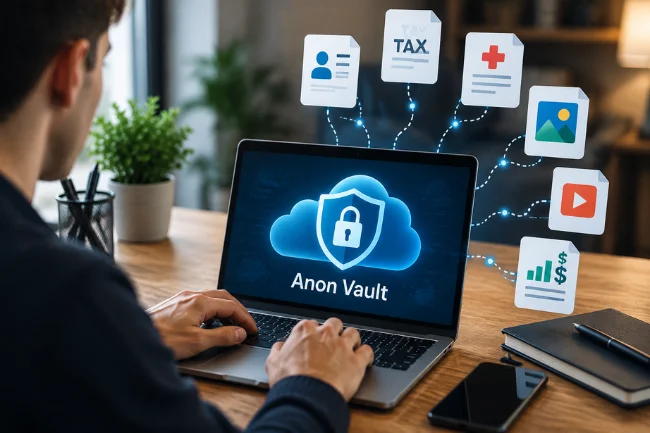
People may use a privacy-focused vault for identity documents, tax records, medical files, family photos, private videos, or financial statements. The main benefit is reducing exposure when files are stored or shared.
Before uploading, remove unnecessary copies from shared devices and check who can access the account. Privacy storage cannot compensate for a weak phone PIN or an unlocked laptop.
Businesses and small teams
A company may want to share contracts, customer records, design files, or financial documents without placing everything in a single administrator-controlled folder. User permissions, access logs, link expiry, and offboarding controls matter more than encryption claims alone.
Businesses should also ask about data residency, retention, backups, service-level commitments, and export options. A privacy system that makes it difficult to retrieve business records can create an operational problem of its own.
Legal and professional users
Law firms, consultants, accountants, and researchers often handle files that require confidentiality and a clear record of access. Tamper-evident logs can support internal review, but legal acceptance depends on the jurisdiction, evidence process, and quality of the implementation.
A storage service should never be treated as a substitute for professional records-management policies. Retention rules, client consent, access reviews, and secure deletion still belong in the organisation’s workflow.
Cryptocurrency users
Encrypted storage can protect seed phrases, wallet backups, and transaction records from casual exposure. I would not assume that a general-purpose file vault is a suitable cryptocurrency wallet. A seed phrase should be protected according to the wallet manufacturer’s guidance, with offline backups and a tested recovery plan.
Anon Vault Compared With Other Privacy Tools
Anon Vault belongs to a wider group of privacy tools, but each one solves a different problem.
| Tool | Main protection | Main limitation |
|---|---|---|
| Anon Vault-style storage | Encrypted file storage and controlled sharing | Quality depends on key management and provider transparency |
| VPN | Hides or routes network traffic | Does not encrypt files after they reach a storage provider |
| Password manager | Protects login credentials | A compromised master account can expose many passwords |
| Encrypted messaging app | Protects messages in transit and supported storage | Files may become exposed on recipient devices |
| Self-hosted storage | Direct control over infrastructure | You manage patches, backups, monitoring, and incident response |
The right choice depends on the threat. A VPN helps with network privacy. A password manager helps with credentials. A self-hosted server may suit a technical team with strong operational skills. A privacy-focused vault is most useful when the main problem is protecting files during storage and controlled sharing.
Privacy Limits You Should Understand
Your device remains part of the security boundary
If malware can read a file before encryption or after decryption, the storage architecture cannot protect it. Keep operating systems updated, use screen locks, avoid unknown browser extensions, and do not open sensitive files on shared computers.
Metadata can reveal a lot
Even when file content is encrypted, metadata may show when a file was uploaded, how large it is, which account accessed it, and who shared a link. Those details can reveal relationships and routines. Ask whether filenames, previews, thumbnails, IP addresses, and access times are encrypted or retained.
Lost keys create a recovery dilemma
The stronger the provider’s inability to decrypt your files, the less power its support team has when you lose the key. Make a secure backup of recovery information and test it with a non-sensitive file before depending on the service.
Shared files can be copied
A recipient needs enough access to view the file. Once the file reaches that person’s device, the owner cannot guarantee that every copy will be deleted. Use watermarking, minimum permissions, expiry dates, and recipient verification for high-risk material.
Decentralization is not a complete security guarantee
Multiple nodes can reduce the impact of one server failure, but they introduce questions about node operators, availability, data repair, and deletion. Ask for a plain-language explanation of the architecture instead of assuming that “distributed” means “private.”
What I Would Check Before Using Anon Vault
When I review a privacy service, I use a simple test: can the company explain its promises in technical, practical, and legal language? Before uploading sensitive information, I would check:
- Whether official documentation identifies the encryption and key-management process.
- Whether an independent audit or penetration-test summary is available.
- Whether the service explains metadata collection, retention, and deletion.
- Whether lost-key recovery is possible and how recovery affects privacy.
- Whether links can be revoked, permissions can be limited, and access can be logged.
- Whether pricing, storage limits, file-size limits, and supported devices are clear.
- Whether the provider publishes an incident-history and vulnerability-reporting policy.
- Whether files can be exported in a usable format if the service closes.
I would begin with test data rather than irreplaceable documents. Upload a harmless file, inspect the permissions, test download and recovery, and confirm that an expired link stops working. That small exercise often reveals more than a security slogan.
FAQs About Anon Vault
Is Anon Vault safe for private files?
It can be useful when encryption, key control, access settings, and device security are implemented properly. Verify independent documentation and audits before trusting it with highly sensitive material.
Does Anon Vault replace a VPN?
No. A VPN protects network routing and traffic visibility, while a vault protects stored files and sharing access. They address different privacy risks.
What happens if I lose my Anon Vault key?
A zero-knowledge design may prevent the provider from restoring access. Save recovery information securely and test the recovery process before storing important files.
Can an expiring link stop someone from copying a file?
No. Expiry can disable future access, but it cannot remove copies, screenshots, or downloads that a recipient already made.
Should I store cryptocurrency seed phrases in Anon Vault?
Only after reviewing the provider’s security model and wallet guidance. For large holdings, offline storage and a tested recovery plan are generally safer than relying on a general file-sharing account.
Final Takeaway
Anon Vault represents a privacy-first approach to digital file storage. Client-side encryption, user-controlled keys, limited identity collection, multi-factor authentication, and carefully managed sharing can reduce several risks found in ordinary cloud storage.
The strongest decision comes from verifying the details behind those promises. Read the key-management policy, check audit evidence, understand metadata exposure, test recovery, and start with non-sensitive files. If the service can answer those questions clearly, you can judge whether its privacy model fits your own risk level instead of relying on a label alone.

Noah Sterling is a technology research writer with 8+ years of experience covering emerging technologies, software trends, digital tools, and innovation. He creates practical, research-based articles to help readers understand the evolving technology landscape.