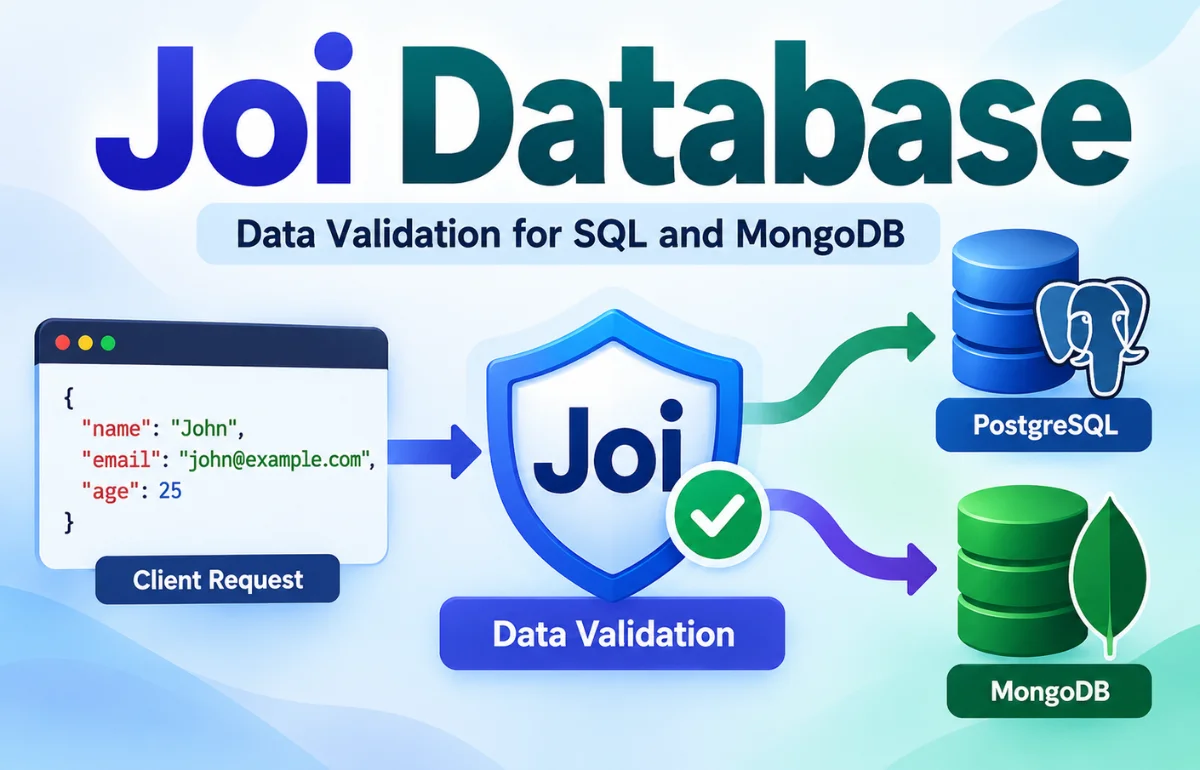
A Joi Database is not a separate database product in the official Joi documentation. The phrase usually describes an application that uses Joi, a JavaScript schema validation library, to check information before saving it to a database such as PostgreSQL, MySQL, or MongoDB. Joi defines which fields are allowed, what types they must contain, and which rules their values must follow. The database then handles storage, queries, indexes, transactions, and access controls.
For example, Joi can reject a missing username before a database write, while the database must still enforce unique emails. Below, I explain both responsibilities through Node.js examples and common mistakes.
Is Joi Database an Actual Database System?
Joi is an established validation library maintained in the JavaScript ecosystem. Its official documentation describes a schema language and data validator; it does not describe a database server, SQL engine, graph store, or real-time analytics platform.
Some websites use “Joi Database” to describe an alleged multi-model engine with built-in AI integrations and exceptionally high ingestion speeds. I would not treat those specifications as product facts without an identifiable vendor, official repository, installation instructions, and independently verifiable benchmarks.
In practice, Joi sits in front of a real data store. It checks input rather than replacing PostgreSQL or MongoDB. You install it as an npm package, not a database service.
How Joi Fits into a Database Application
Picture an online shop accepting a new product listing. A customer-facing form submits a product name, price, category, and stock quantity. Before that information reaches the database, the server should check that the name is present, the price is positive, and the quantity is a whole number.
I think of the process as three checkpoints: validate the request, apply business rules, and let the database enforce its own constraints. Each layer catches different problems.
- Request validation: Joi checks field formats, allowed values, required properties, and nested structures.
- Business logic: Application code checks permissions, pricing policies, and whether the action makes sense.
- Database enforcement: The database protects unique keys, foreign keys, transactions, and persisted records.
| Layer | Main responsibility | Example |
|---|---|---|
| Joi validation | Check incoming data shape and values | Price must be a positive number |
| Application logic | Enforce contextual rules | Seller may edit only their products |
| Database constraints | Protect stored data across all writers | SKU must be unique |
A scheduled import or another service may write directly to the database without calling your API. Unless those writers also validate their inputs, Joi cannot protect their writes. Database constraints remain necessary.
What Can Joi Validate Before a Database Write?
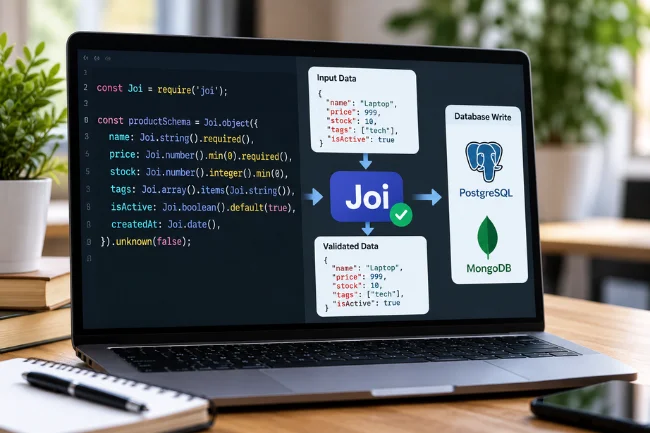
Joi supports far more than checking whether a field is empty. You can describe strings, numbers, dates, arrays, objects, booleans, alternatives, and relationships between fields. It can also normalize certain values, depending on your settings.
Required Fields and Data Types
A registration endpoint can require a username and email while allowing a biography to remain optional. A product endpoint can require an integer stock count and reject a negative price. These checks prevent predictable mistakes from traveling through the rest of your application.
One detail catches developers off guard: Joi fields are optional by default. Adding Joi.string() does not automatically make a value mandatory. Use .required() when omission should be an error, and distinguish a missing field from an empty string or null.
Formats, Ranges, and Nested Information
Methods such as .email(), .min(), .max(), .integer(), and .valid() let you express everyday rules clearly. For an order containing multiple products, Joi.array().items(...) can validate each line item rather than checking only the outer object.
I value readability here: a well-named schema reveals the expected request shape without searching several controllers.
Data Conversion and Unknown Fields
By default, Joi may convert compatible values during validation. For example, a numeric string can become a number. That can be convenient for query parameters, but surprising for sensitive fields where the exact input type matters.
Use { convert: false } when strict input types are required. Unknown object keys are rejected by default; stripUnknown can remove them instead. I prefer rejecting unexpected fields on sensitive write endpoints because silently deleting a misspelled property can hide a client-side bug.
Getting Started with Joi in Node.js
You need a working Node.js project. Install Joi from npm:
npm install joiCheck the Joi module status page for Node.js compatibility. Major releases can require different runtimes, so verify your deployment version.
Create a Reusable Product Schema
I would begin with the smallest useful schema and expand it as the application grows:
const Joi = require('joi');

const productSchema = Joi.object({
  name: Joi.string().trim().min(2).max(100).required(),
  price: Joi.number().positive().precision(2).required(),
  stock: Joi.number().integer().min(0).required(),
  category: Joi.string()
    .valid('books', 'electronics', 'home')
    .required(),
  tags: Joi.array().items(Joi.string().trim()).max(10)
});

const input = {
  name: 'Desk lamp',
  price: 29.99,
  stock: 8,
  category: 'home'
};

const { error, value } = productSchema.validate(input, {
  abortEarly: false
});

if (error) {
  console.log(error.details.map(item => item.message));
} else {
  console.log(value);
}
If the object follows the rules, value contains the validated result and error is undefined. If it fails, the details array identifies the problems. Setting abortEarly: false collects multiple validation issues in one pass, which is especially helpful when users submit a long form.
I use the returned value rather than the original input, because validation may trim, convert, or apply defaults. Don’t assume the original object changed.
Connecting Joi to PostgreSQL
Here’s how the validation layer fits into a real SQL-backed API. Suppose a PostgreSQL database has a products table with name, price, stock, and category columns. Its price and stock columns should also have database-level checks.
CREATE TABLE products (
  id bigint GENERATED ALWAYS AS IDENTITY PRIMARY KEY,
  name text NOT NULL,
  price numeric(12, 2) NOT NULL CHECK (price > 0),
  stock integer NOT NULL CHECK (stock >= 0),
  category text NOT NULL
);
With Express and the pg driver installed, an endpoint can validate a request before inserting a record. Export the earlier schema from schemas.js using module.exports = { productSchema }. Set DATABASE_URL to your PostgreSQL instance.
const express = require('express');
const { Pool } = require('pg');
const { productSchema } = require('./schemas');

const app = express();
const pool = new Pool({ connectionString: process.env.DATABASE_URL });
app.use(express.json());

app.post('/products', async (req, res) => {
  const { error, value } = productSchema.validate(req.body, {
    abortEarly: false
  });

  if (error) {
    return res.status(400).json({
      errors: error.details.map(item => item.message)
    });
  }

  try {
    const { rows } = await pool.query(
      `INSERT INTO products (name, price, stock, category)
       VALUES ($1, $2, $3, $4) RETURNING *`,
      [value.name, value.price, value.stock, value.category]
    );
    return res.status(201).json(rows[0]);
  } catch (err) {
    console.error('Database insert failed:', err);
    return res.status(500).json({ error: 'Unable to save product' });
  }
});
The SQL parameters $1 through $4 are significant: validation does not replace parameterized queries. Joi improves request feedback, SQL constraints defend stored values, and parameter binding separates input from SQL syntax. For financial amounts, I prefer integer minor units or decimal-safe handling over floating-point arithmetic.
In production, I would add authentication, centralized error handling, and tests.
Using Joi with MongoDB and Mongoose
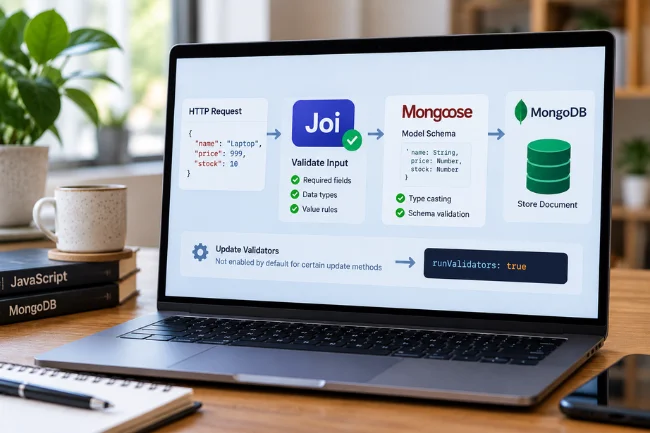
The same approach works with document databases. Joi validates the HTTP request, while MongoDB stores the document. If you use Mongoose, its own schema system can provide another layer of type casting and validation when documents are saved.
A typical flow is straightforward: validate req.body with Joi, use the returned value to create a Mongoose model instance, and save it. This lets you return understandable API errors before asking Mongoose to persist a record.
However, the two schemas serve different jobs. Joi describes acceptable input for a particular operation. A Mongoose schema describes how documents are modeled and validated through that library. According to the Mongoose validation documentation, update validators are not enabled by default for certain update methods; they require runValidators: true and still have limitations.
That nuance matters for applications with create, edit, bulk import, and background-job workflows. One schema at the API boundary does not guarantee that every future document update passes the same checks.
Joi vs Mongoose, Zod, and Database Constraints
People often compare these tools as if they all do the same job. They overlap in validation, but they operate at different layers. I find it more useful to choose them based on where a rule must be enforced.
| Tool or feature | Main role | Best fit | What it does not replace |
|---|---|---|---|
| Joi | Runtime JavaScript data validation | Node.js APIs, forms, configuration | Database and persistence rules |
| Zod | TypeScript-friendly runtime validation | Type-driven application schemas | Database constraints |
| Mongoose | MongoDB object modeling and validation | Applications using MongoDB models | General API authorization |
| PostgreSQL constraints | Enforce relational data integrity | Unique values, references, check rules | Friendly request-level error messages |
| MongoDB collection validation | Enforce document rules at the database layer | Protecting stored document structure | Full application business logic |
I would choose Joi when a Node.js service needs expressive rules and predictable validation errors. I would lean toward Zod when TypeScript type inference is central to the project. For MongoDB projects, Mongoose can be valuable alongside either validator, depending on the architecture.
Payment systems may need API validation, transaction logic, and database constraints together. No single tool replaces every layer.
Advanced Joi Patterns Worth Knowing
Conditional Validation
Some fields become mandatory only under certain conditions. A delivery address may be required when deliveryMethod is shipping, but not when a customer chooses pickup. Joi’s .when() method can express that relationship inside the schema rather than scattering conditional checks through a route handler.
Conditional rules deserve dedicated tests for both branches. A schema that works for ordinary orders can still reject valid pickup requests or accept shipping requests with missing addresses if the condition is written incorrectly.
Creating Separate Schemas for Updates
A create request and an update request should not always share identical requirements. New products may require name, price, stock, and category, while a PATCH request might change only the price.
I recommend an update schema with optional fields that remain validated when supplied. Reject empty patches, too.
Asynchronous Checks and Uniqueness
Joi supports asynchronous external validation rules through .external() and validateAsync(). These can help when a validation decision depends on external information, such as whether an invitation code exists.
But an API-level “is this email available?” check cannot guarantee uniqueness. Two requests can pass that check simultaneously. Enforce uniqueness with a database index or constraint, then handle its conflict response cleanly. This is a useful boundary between nice error messages and actual data integrity.
Security, Performance, and Maintenance
Joi is a validation tool, not a security system. It cannot authenticate users, decide whether someone may access a record, encrypt stored fields, or prevent every injection vulnerability. Those responsibilities belong to authorization logic, safe database APIs, and infrastructure controls.
I prefer to validate at clear trust boundaries: incoming HTTP requests, message-queue payloads, imported files, and external service responses. That catches errors before untrusted data becomes part of the application state.
For performance, define frequently used schemas once rather than rebuilding them for every request. Measure validation overhead with representative payload sizes, especially deeply nested arrays. Avoid publishing impressive throughput numbers without a reproducible test environment; actual results depend on both the schema and the workload.
Version schemas, test good and bad inputs, and revisit rules when database models change. An API-optional field that stays NOT NULL in SQL causes confusing failures.
Common Joi Database Mistakes
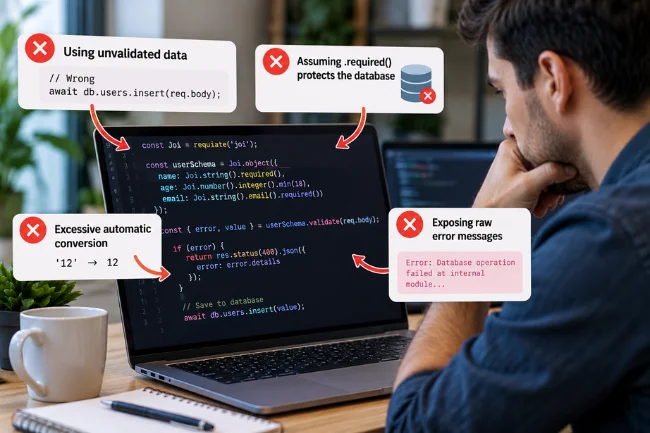
One common mistake in example code is validating an object and then saving the unvalidated original. That discards the benefit of trimming and type normalization. Use the returned result after confirming there is no error.
Another mistake is assuming a .required() rule means a column is protected forever. It only applies wherever that Joi schema runs. Direct SQL commands, alternative APIs, and scripts may bypass it entirely.
A third problem is excessive automatic conversion. Converting '12' to 12 may be harmless for a stock field; converting identifiers or security-related inputs without explicit intent can be confusing. Choose strictness by endpoint instead of copying one set of options everywhere.
Finally, avoid exposing raw validation context or database errors to users. Translate issues into clear, field-specific messages while logging technical details appropriately. A useful message says the price must be greater than zero, not that an internal database operation failed.
When Does a Joi-Based Database Workflow Make Sense?
Joi is especially useful for REST APIs, account registration, checkout forms, administrative dashboards, import pipelines, and applications receiving structured JSON from outside systems. In those cases, a declared schema helps keep request handling consistent as the codebase grows.
It may be unnecessary for a tiny script with fixed, trusted inputs, or in a stack already using another validator effectively. I would not introduce two competing validation libraries simply because one has a familiar name. The right choice is the one that your team can maintain, test, and apply consistently.
A Practical Next Step
If you are searching for Joi Database, start by identifying the job you actually need done. For reliable data storage, select a documented database. For JavaScript input validation, add Joi at the application boundary and leave persistent integrity rules in the database.
I recommend taking one existing API endpoint, defining its accepted input with Joi, testing several invalid payloads, and checking that your database still rejects impossible values. That small exercise reveals the difference between valid requests and trustworthy stored data far more clearly than a list of promised features.
Frequently Asked Questions
Is Joi a database or a validation library?
Joi is a JavaScript schema validation library, not a database server. It checks values before an application sends them to storage.
Can I use Joi with MongoDB?
Yes. Validate incoming data with Joi, then save the accepted values using the MongoDB driver or Mongoose.
Does Joi work with PostgreSQL and MySQL?
Yes. Joi validates JavaScript values independently of the database, so it can sit in front of either SQL database.
Is Joi free to use?
Yes. The official Joi package is open source under a BSD license; review its license and dependencies for your project.
Does Joi replace database constraints?
No. Keep database checks, unique indexes, and foreign keys where appropriate because other writers can bypass Joi validation.

Noah Sterling is a technology research writer with 8+ years of experience covering emerging technologies, software trends, digital tools, and innovation. He creates practical, research-based articles to help readers understand the evolving technology landscape.