Zvideo is a name used for more than one video-related product, so the first thing I would clarify is exactly what it means. In 2026, one active service using the ZVideo name operates as a browser-based AI video and image creation platform. It can turn text prompts or reference images into generated visual content and also provides AI-assisted image editing tools. Historically, however, ZVideo was also the name of an informational-video feature launched inside Alibaba’s Quark search app in 2020.
That distinction matters because numerous websites currently describe Zvideo as a conventional YouTube-style video-sharing or streaming network. During my research, I could not verify one official service matching all of those descriptions. If you’re searching for Zvideo today, identifying the specific website or product is therefore more useful than assuming every reference describes the same platform.
What Is Zvideo?
The current ZVideo service I was able to verify is primarily an AI video generator, AI image generator, and visual editing platform. Its public website describes text-to-video and image-to-video generation alongside tools for modifying existing images with natural-language instructions.
In practical terms, this means a user can describe a visual idea in text or provide an existing image and use AI models to produce new content. The platform is aimed more at content creation than traditional video hosting.
This is quite different from uploading a vlog to YouTube, scrolling through TikTok videos, or building a Vimeo portfolio.
What made researching Zvideo unusual for me was the amount of conflicting information surrounding the name. Some articles describe live streaming, creator subscriptions, advertising revenue, social feeds, playlists, donations, and other community features without clearly linking those claims to an identifiable official product.
For that reason, I would treat Zvideo as an ambiguous search term rather than a single universally recognized platform.
Why Is There So Much Confusion Around Zvideo?
There are at least three different contexts appearing around the Zvideo name.
| Zvideo reference | What it appears to mean | What can be verified |
|---|---|---|
| Alibaba/Quark ZVideo | An informational-video section within Quark | Reported as launching in July 2020 |
| Current ZVideo.app | AI video and image generation/editing service | Text-to-video, image-to-video, editing and related AI tools |
| “Zvideo streaming platform” described by blogs | Supposed social video-sharing network | Many features are repeated online, but a single authoritative official platform is difficult to establish |
The historical version has the clearest origin story. In July 2020, KrASIA reported that Alibaba’s Quark intelligent search app had introduced an in-app section called ZVideo for informational videos covering different subjects. The move was part of Quark’s broader content and search ecosystem.
There is even a project from Alibaba Design documenting the creation of an introductory video for that ZVideo product, further supporting its historical connection to Quark.
The current ZVideo.app presents something different. Its homepage identifies the service as an AI video and image generator rather than an open social-media network.
That is why I would always check the domain before relying on a Zvideo review, pricing claim, download page, or feature list.
How Does the Current ZVideo Work?
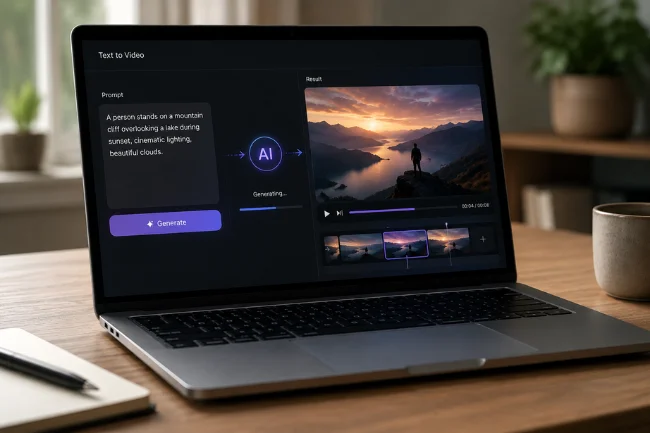
The basic concept is straightforward: you provide instructions or source material, an AI model processes that input, and the service produces or edits visual content.
Text-to-Video Generation
Text-to-video technology allows you to describe a scene using ordinary language.
Instead of filming every element with a camera, you might describe the subject, setting, visual style, lighting, composition, and desired movement. The AI then interprets those instructions and attempts to create a corresponding video.
ZVideo’s public site specifically identifies text-to-video generation as one of its core functions.
For creators, this type of workflow can be useful for concept videos, social media visuals, story ideas, promotional material, mood pieces, and experimental content.
Image-to-Video Generation
Image-to-video begins with an existing visual rather than text alone.
A still image can serve as the reference, while AI introduces movement or generates a sequence around it. This makes the technology particularly interesting for creators who already have product photographs, illustrations, character designs, concept art, or branded imagery.
The ability to start from a reference can also give creators more visual direction than generating a scene entirely from text.
Natural-Language Image Editing
ZVideo also advertises natural-language image editing. Rather than relying entirely on traditional editing controls, users can describe requested changes conversationally.
For example, an AI editing workflow may involve changing the setting, adjusting visual elements, modifying composition, or creating a variation while attempting to preserve important parts of the original image.
Character and Scene Consistency
One persistent challenge with generative visual tools is consistency. A character’s face, clothes, proportions, lighting, or surroundings can change unexpectedly between generations.
ZVideo describes tools intended to preserve characters and scenes during visual editing. It also advertises multi-image remixing, allowing more than one reference image to contribute to a new result.
I consider this a more meaningful feature than simply producing endless random variations. For creators working on campaigns or recurring characters, consistency often determines whether generated content can actually be used.
Aspect Ratio Controls
Different publishing channels require different dimensions.
A horizontal website video, vertical social clip, square post, and advertisement may all need different framing. ZVideo lists aspect-ratio presets such as 1:1, 16:9, and 4:5 for its visual-generation and editing tools.
That can reduce the amount of resizing required after generation.
Zvideo vs Traditional Video-Sharing Platforms
One of the easiest mistakes is comparing Zvideo directly with YouTube or TikTok as though they provide exactly the same service.
Based on the current product information I could verify, that comparison needs more nuance.
| Feature | Current ZVideo AI service | Traditional video-sharing platform |
|---|---|---|
| Main purpose | Generate and edit visual content | Host, distribute and discover videos |
| Text-to-video creation | Core function | Usually not the primary function |
| Image-to-video | Available | Usually requires another creation tool |
| Public creator channels | Not clearly documented as the main product | Core feature |
| Recommendation feed | Not established as the primary experience | Usually central |
| Audience analytics | Not clearly documented as a creator-network feature | Common |
| Ad-revenue sharing | Not clearly documented | Available on some major platforms |
| Viewer comments/community | Not established as the main service | Common |
| AI image tools | Core part of the service | Usually secondary or unavailable |
This distinction also exposes one of the biggest weaknesses in many existing Zvideo articles: they combine AI creation, video hosting, streaming, social networking, creator monetization, and community features into one product without providing primary evidence.
A trustworthy guide should separate confirmed features from assumptions.
Is Zvideo Free?

I would not describe Zvideo simply as “completely free.”
The current ZVideo terms explicitly discuss paid plans, purchases, and payment processing, while its privacy policy mentions purchases of credits, subscriptions, and add-on features. Prices can change, so checking the active service before purchasing is more reliable than using an old pricing figure from a third-party article.
This is particularly relevant because different websites use very similar ZVideo or Z-Video branding.
Before paying, I recommend checking the exact domain, included generation credits, output restrictions, refund conditions, commercial-use terms, and whether a subscription renews automatically.
What Happens to Content You Upload?
This is an area I believe deserves much more attention than most Zvideo articles give it.
According to the current ZVideo privacy policy, the service may process account information, usage details, device information, prompts, uploaded reference images, generated outputs, cookies, and payment-related information. The policy states that generated-content data is used to provide requested functionality, maintain account history, and support safety systems.
Its terms also state that users retain ownership of prompts, reference uploads, and outputs they are legally entitled to create, subject to applicable law and usage policies. However, submitting content grants the service a license necessary to host, process, modify, store, and use that content for operating, improving, and securing the platform.
For ordinary experimental images, that may not be a major concern.
For confidential client photographs, unreleased products, private documents, children’s images, sensitive business material, or intellectual property belonging to someone else, I would read the latest terms before uploading anything.
Is Zvideo Safe to Use?
There is no responsible way to say that every website called Zvideo is automatically safe.
The active ZVideo service I reviewed publishes a privacy policy and terms of service. Its privacy documentation says it uses measures including encryption in transit and at rest, access controls, and monitoring, while also acknowledging that no transmission or storage system can be completely secure.
The more useful safety rule is to verify the exact service you are visiting.
I would check:
- Whether the domain matches the service you intended to use
- Whether privacy and terms pages are available
- What happens to uploaded images and prompts
- Whether payment terms are clearly stated
- Whether generated content can be used commercially
- Whether you retain rights to your output
- What personal information is collected
The name alone is not a trust signal.
Can Zvideo Content Be Used Commercially?
Commercial use requires checking the terms attached to the particular plan and service you’re using.
The current ZVideo terms say users retain ownership of prompts, references, and outputs they are legally entitled to create, but that does not automatically guarantee that every possible AI-generated asset is free of third-party rights issues.
For commercial projects, I would pay particular attention to trademarks, copyrighted characters, celebrity likenesses, client-owned assets, music, logos, and reference images.
The platform’s disclaimer also says ZVideo is an independent product providing access to third-party models and is not affiliated with companies such as OpenAI or Google merely because their technology or names may appear within the service.
That is another detail worth understanding before treating “ZVideo” as the creator of every underlying AI model.
Who Is Zvideo Best Suited For?
The AI-focused version of ZVideo makes the most sense for people who want to create visual material without handling every production task manually.
Potential users include:
- Social media creators producing short visual concepts
- Marketers testing creative ideas
- Designers developing campaign concepts
- Small businesses creating promotional visuals
- Storytellers visualizing scenes before production
- Artists experimenting with image animation
- Content teams producing multiple visual variations
I would view it as a creative production tool first rather than automatically treating it as a replacement for YouTube, TikTok, Vimeo, or another distribution platform.
You may still need a separate channel for publishing, building an audience, measuring viewer behavior, and monetizing completed videos.
The Most Useful Thing to Know Before Using Zvideo
After reviewing Zvideo search results, official-looking product pages, policy documents, and the historical record, my biggest takeaway is simple: verify which Zvideo someone is talking about.
That sounds obvious, but it solves much of the confusion surrounding this keyword.
A 2020 article may be describing Alibaba’s Quark feature. A current website may be discussing AI video generation. Another blog may describe a supposed social streaming platform with monetization and live-streaming features.
Those claims should not automatically be combined.
If you’re evaluating Zvideo for work, check the exact URL and current documentation before creating an account, uploading private material, or paying for credits. That one habit is more useful than relying on a long list of features copied between third-party articles.
FAQs About Zvideo
What is Zvideo used for?
Current ZVideo services primarily focus on AI-assisted video and image generation, including text-to-video, image-to-video, and visual editing.
Is Zvideo free to use?
Some access may vary by service, but the current ZVideo documentation refers to paid plans, credits, subscriptions, and add-ons, so users should check current pricing before signing up.
Is Zvideo a video-sharing platform like YouTube?
I could not verify that the current ZVideo AI service operates primarily as a YouTube-style public video-sharing network; its documented focus is AI content generation and editing.
Is Zvideo safe?
Safety depends on the specific Zvideo website. Check its privacy policy, data practices, payment terms, content rules, and exact domain before uploading files or purchasing a plan.
Who owns Zvideo?
The name has been used in different contexts. A documented ZVideo feature was launched through Alibaba’s Quark app in 2020, while current independently operated ZVideo-branded AI services should not automatically be assumed to be the same product.
Final Thoughts
Zvideo is interesting partly because the name now sits at the intersection of video creation, generative AI, and older video-platform history. The most reliable current information points toward AI-powered video and image creation, while historical reporting connects another ZVideo product to Alibaba’s Quark app.
If you’re considering using Zvideo, start by confirming the exact website and what you want it to do. Then review its current features, privacy terms, commercial rights, and pricing before uploading valuable material or paying for a plan.
That approach gives you a much clearer picture of Zvideo than relying on generic claims about streaming, monetization, or social-media features that may refer to an entirely different service.

Noah Sterling is a technology research writer with 8+ years of experience covering emerging technologies, software trends, digital tools, and innovation. He creates practical, research-based articles to help readers understand the evolving technology landscape.