InSnoop is a browser-based Instagram story viewer designed to let people view content from public Instagram profiles without signing in to an Instagram account. A visitor enters a public username or profile link, searches for the account, and opens the stories that the service can retrieve. InSnoop also advertises support for public highlights and media downloads. It is currently presented as free, requires no registration, and works through a web browser rather than a required installation. However, “anonymous” has a limited meaning here: your Instagram username may not appear in the story owner’s viewer list, but the InSnoop website can still receive technical information such as your IP address and browsing activity. InSnoop describes itself as a fan site and states that it is not connected with Instagram.
How Does InSnoop Work?
The official InSnoop homepage describes a simple process. You copy an Instagram username or profile link, paste it into the search box, and select the search option. If the profile is public and suitable content is available, the viewer displays its stories without asking you to log in to Instagram.
InSnoop does not publicly explain the technical system it uses to obtain Instagram content. I would therefore avoid claiming that it uses a specific proxy system, cache, burner account, scraper, or Instagram API.
Those methods are not confirmed by the service’s public pages.
Main Features Advertised by InSnoop
| Feature | What the official site says | What users should understand |
|---|---|---|
| Anonymous story viewing | Your account does not appear in the story owner’s “seen” list | This does not necessarily make you anonymous to the website itself |
| No Instagram login | No Instagram account or login is required | A page asking for your Instagram password should be treated cautiously |
| Public highlights | Highlights from public profiles can be viewed | Private-account highlights remain restricted |
| Media downloads | Images and videos may be saved in JPEG and MP4 formats | Downloading does not transfer copyright or reuse rights |
| Browser access | The tool works on phones, tablets, and computers | The homepage says no new application needs to be installed |
| Free access | The current service is presented as free and without signup | Its terms allow the provider to introduce charges later with notice |
These features are based on statements published on InSnoop’s homepage and in its current terms. They should be treated as the service’s claims rather than independent guarantees of performance.
What Does “Anonymous” Mean on InSnoop?
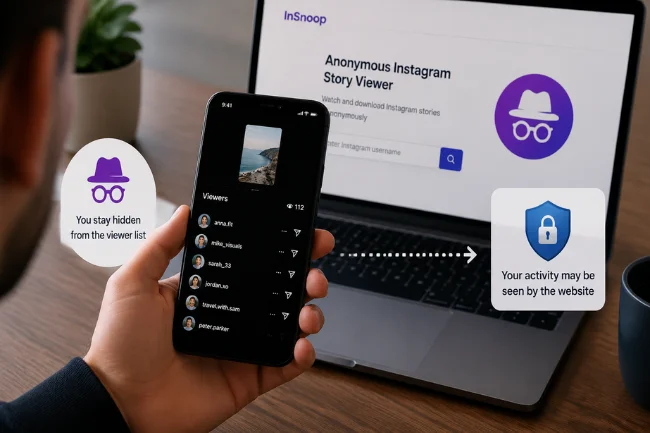
The word anonymous can create the wrong expectation. In this context, it primarily means anonymous to the owner of the Instagram profile you are viewing.
When you watch a story through your own Instagram account, the account owner can normally see your username in the viewer list. InSnoop claims that its viewer prevents your personal account from appearing there because you are not signed in through your account.
That is different from being invisible across the internet. Like most websites, InSnoop can receive information sent by your browser and network connection.
I separate anonymity from the account owner from privacy on the third-party website. InSnoop’s homepage focuses on the first issue, while its privacy policy addresses the second.
Does InSnoop Collect User Data?
According to the InSnoop privacy policy effective July 14, 2026, the service may collect a device’s IP address, the pages visited, visit dates and times, time spent on pages, and operating-system information.
The policy also states that the application or its third-party tools may use cookies, SDKs, pixels, and similar technologies for functionality, analytics, or service delivery. Google Analytics for Firebase is listed as a third-party service.
This creates a noticeable inconsistency with the homepage FAQ. The FAQ says the website does not track user behavior and that only search history and favorites are saved in the browser. The detailed privacy policy describes broader data collection than that short answer suggests.
For readers, the safer interpretation is to rely on the detailed privacy policy rather than the simplified marketing statement.
| Privacy question | What the current policy indicates |
|---|---|
| Is an IP address collected? | It may be collected automatically |
| Is visit activity recorded? | Pages visited, visit time, and time spent may be collected |
| Are cookies or similar tools used? | The policy says they may be used |
| Are third-party analytics mentioned? | Google Analytics for Firebase is listed |
| How long may automatically collected data be retained? | Up to 24 months, unless longer retention is legally required |
| Can users request deletion? | Users may contact the provider to exercise deletion rights, subject to legal obligations |
This does not prove that the service misuses information. It does mean that “anonymous Instagram viewer” should not be interpreted as “no information is collected.”
Is InSnoop Safe to Use?
InSnoop’s main safety advantage is that its official pages say users do not need to provide Instagram credentials. Still, users should consider domain impersonation, tracking, downloads, redirects, and changing policies.
When I assess this type of service, I follow several practical rules.
Confirm That You Are on the Intended Website
Anonymous viewing tools can attract copycat domains. A lookalike site may imitate a recognizable name while asking for passwords, payment details, browser permissions, or software installation.
The official InSnoop service describes itself as a browser-based viewer that does not require an Instagram login or a new application installation. A page that behaves very differently should be treated cautiously.
Never Enter Your Instagram Password
The official homepage says no Instagram account or login is required. There is therefore no reasonable need to submit your Instagram username and password to use its advertised public-story viewer.
Leave the page if it asks for an Instagram password, recovery code, or two-factor authentication code.
Avoid Unnecessary Software
InSnoop presents its main service as an online tool that works on mobile and desktop browsers. It also says users do not need to install a new application.
If a page unexpectedly requires an executable file, browser extension, configuration profile, or mobile application package, stop and confirm that you are using the intended service.
Treat Downloaded Media Responsibly
The homepage says photographs can be downloaded as JPEG files and videos as MP4 files. It also says that the content remains the property of its respective owner.
Public visibility is not permission to republish. Avoid reposting, selling, editing, or using someone else’s material commercially without permission or another valid legal basis.
Can InSnoop View Private Instagram Accounts?
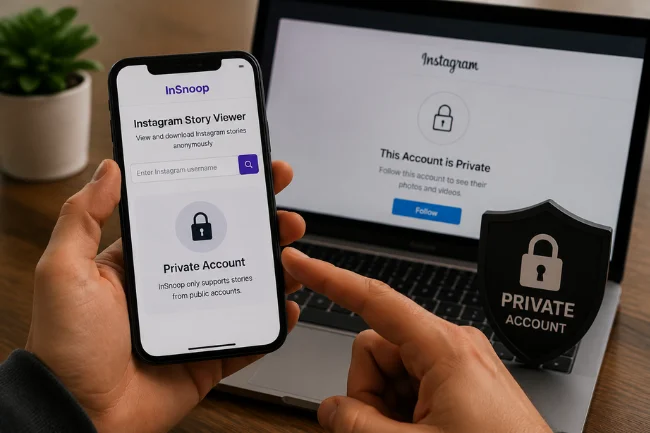
No. The official InSnoop FAQ says its technology currently supports stories from public accounts only.
That limitation is consistent with the purpose of Instagram privacy settings. A private account restricts its content to approved followers. A third-party website should not be able to override that access control simply because someone enters a username.
Claims about private stories, direct messages, passwords, or deleted conversations are warning signs because those features fall outside InSnoop’s advertised public-story function.
If a website promises access to a private Instagram account in exchange for a survey, subscription, download, or login, do not assume that it can deliver what it promises.
Why InSnoop May Not Show a Story
A failed search does not always mean that InSnoop is permanently broken.
The username may be misspelled, changed, private, or associated with an account that has no active story. A creator may also have deleted the story or saved it only as a highlight.
Third-party viewers can experience technical interruptions. They depend on access to Instagram-facing systems that may change, restrict automated activity, or temporarily stop returning content.
Instagram’s Terms of Use prohibit attempts to access or collect information in unauthorized ways, including certain forms of automated collection without permission. Third-party viewing services may therefore be less stable than Instagram’s native platform.
When InSnoop returns no result:
- Check that the username is spelled correctly.
- Confirm that the Instagram profile is public.
- Check whether the profile currently has an active story.
- Try again later in case the service is temporarily unavailable.
- Do not install software or submit credentials to “unlock” the result.
InSnoop vs. Viewing Stories on Instagram
The better option depends on whether privacy from the account owner or platform reliability matters more to you.
| Consideration | InSnoop | |
|---|---|---|
| Account required | No account is advertised as necessary | An account is generally needed for normal in-app use |
| Viewer-list identity | InSnoop says your personal account will not appear to the story owner | Your account may appear to the story owner |
| Private profiles | Not supported | Approved followers can view private stories |
| Reliability | May change or experience interruptions | Native platform access is generally more dependable |
| Privacy relationship | You interact with a third-party website | Your activity is handled within Meta’s platform |
| Full engagement features | Limited viewing and download functions | Replies, reactions, navigation, and other native tools are available |
InSnoop prioritizes viewing without connecting the activity to your personal Instagram identity. In return, you depend on a third-party service and accept its data practices and technical limitations.
For time-sensitive research, evidence collection, account management, or detailed profile analysis, InSnoop is too limited to serve as the only source.
Useful and Responsible Ways to Use InSnoop
A social media professional might use InSnoop to observe public competitor campaigns without using a personal Instagram account.
Public stories can reveal:
- Product launches
- Promotional timing
- Calls to action
- Visual styles
- Polls and audience questions
- Discount language
- Recurring campaign themes
- User-generated content
Creators can also check their own public stories, while people without Instagram may use the tool to view public updates from businesses, teams, events, community organizations, or public figures.
InSnoop’s homepage specifically presents competitor monitoring, reviewing your own stories, and checking live public stories as possible use cases.
I would not rely on it for sensitive personal monitoring. It should not be used to harass someone, repeatedly observe a private individual, evade personal boundaries, or make serious decisions about employment, relationships, legal disputes, or personal safety.
Third-party viewers can miss content or stop working. They also cannot provide internal Instagram performance data such as reach, impressions, link clicks, audience demographics, or conversions.
Is InSnoop Legal?
The answer depends on the user’s country, the content involved, and what the user does with it.
Viewing publicly accessible material is not the same as bypassing access controls, collecting content at scale, republishing copyrighted media, impersonating someone, or using information for harassment. Those activities can raise different legal, privacy, copyright, and contractual issues.
InSnoop’s terms require users to comply with applicable law. They also prohibit conduct that violates intellectual-property, privacy, or personal-data rights.
Instagram’s Terms of Use restrict unauthorized access and collection of information, including certain automated methods.
For ordinary use, stay within public content, respect copyright, avoid invasive monitoring, and do not assume that a download option grants permission to reuse a file.
My Assessment of InSnoop
InSnoop is a focused web tool for viewing public Instagram stories without using a personal Instagram login. Its appeal comes from convenience: no signup, browser access, public highlight support, and advertised image or video downloads.
Its limitations matter just as much. It cannot view private accounts, may not be as reliable as Instagram, and does not provide complete anonymity in the broad privacy sense.
The most useful detail I found is the difference between the homepage’s privacy language and the current privacy policy. The homepage FAQ suggests that user behavior is not tracked, while the privacy policy describes the collection of IP addresses, page visits, operating-system information, cookies, and analytics-related data.
I would treat InSnoop as a low-stakes public-content viewer, not as a secure investigation tool or a guarantee of invisibility.
Before using it, check the correct domain, read the latest privacy policy, keep all account credentials private, and respect the content owner’s rights.
Frequently Asked Questions
Is InSnoop free to use?
The official homepage currently presents InSnoop as free and says there are no signup requirements. Its terms allow the provider to introduce charges later with notice.
Does InSnoop show my username to the story owner?
InSnoop says your personal Instagram account will not appear in the story owner’s seen list when you use its anonymous viewer.
Can InSnoop view private Instagram accounts?
No. The official FAQ states that InSnoop currently supports stories from public Instagram accounts only.
Does InSnoop collect personal data?
Its privacy policy says it may collect IP addresses, visit details, operating-system information, cookies, and analytics-related data.
Does InSnoop have an official mobile app?
The official homepage presents InSnoop as a browser-based tool for phones, tablets, and computers and says no new application needs to be installed. It does not direct visitors to a separate mobile app download.
Final Word
InSnoop may be useful when you want a quick way to view a public Instagram story without connecting the view to your personal account.
Use it only for low-risk, legitimate purposes, and review its current privacy terms before relying on the word anonymous.
Your next step is straightforward: verify the intended domain, avoid every Instagram login prompt, and use the service only for public content you have a legitimate reason to view.

Ava Bennett is a social media strategy writer with 7+ years of experience covering social platforms, content trends, audience engagement, and digital communication strategies. She creates practical insights to help readers understand the evolving social media landscape.