inurl:spatial is a search query that asks a search engine to find pages with the word “spatial” somewhere in their URL. The inurl: part acts as a URL filter, while spatial is the term being filtered. A page such as example.com/spatial-data/ may qualify because its address contains that word.
This query does not perform a spatial database search, calculate distances, or automatically limit results to geographic information systems. It simply looks for a text pattern in web addresses. I use it as a discovery tool when I want to uncover GIS resources, examine a competitor’s URL structure, locate spatial-data documents, or see how a site organizes a topic. The results still need human review because a matching URL can be irrelevant, outdated, or low quality.
How Does Inurl Work?
The query has two parts:
inurl:tells the search engine to pay attention to the URL.spatialsupplies the word to look for.
Enter the query without a space after the colon:
inurl:spatial
A space changes the instruction. inurl: spatial may be interpreted as an ordinary search containing a detached operator and keyword, so it is not the syntax I rely on.
The match can occur in different parts of an address. It might appear in a subdomain, directory, page slug, filename, or even a URL parameter. For example, all of these addresses contain the visible string “spatial”:
spatial.example.com/example.com/spatial/research/example.com/guides/spatial-analysis/example.com/downloads/spatial-data.pdf
That does not mean every page is primarily about GIS. “Spatial” can describe architecture, audio, computing, psychology, design, databases, analytics, or a product name. The operator filters an address; it does not understand your intended subject by itself.
A documentation detail worth knowing
Google’s current public Search Help page explains operator syntax and lists popular options such as site:, filetype:, quotation marks, exclusions, before:, and after:. At the time of writing, that page does not include inurl: in its public list.
SEO practitioners still commonly use inurl: as a working search pattern, but I would not describe it as a guaranteed reporting feature. Search interfaces change, result sets fluctuate, and an undocumented behavior deserves more caution than an official analytics tool.
What Can You Find With Inurl?
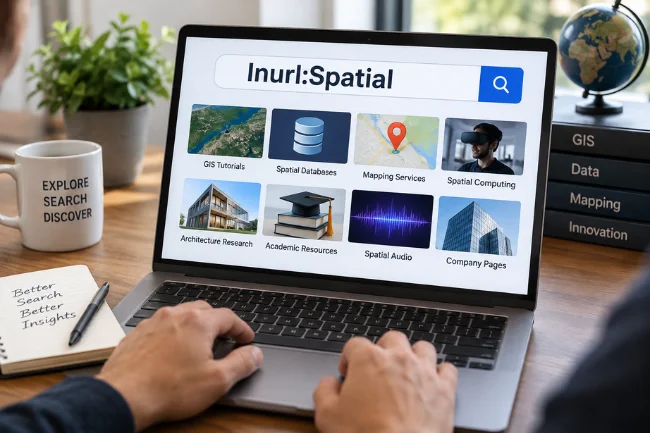
The basic query can surface a wide mix of pages. Common categories include:
- GIS tutorials and geospatial-data portals
- Spatial database documentation
- Mapping and location-intelligence services
- Spatial computing and mixed-reality products
- Architecture and interior-space research
- Academic papers, course pages, and laboratory resources
- Spatial audio or sound-design content
- Product, project, or company pages using “spatial” in the name
The variety is useful during exploration, but it also creates noise. If I am researching PostGIS, a result about spatial audio is technically a match but practically useless. The best improvement is to add a plain-language intent term after the operator.
inurl:spatial PostGIS
inurl:spatial architecture
inurl:spatial "location intelligence"
The extra term tells the search engine what kind of spatial content matters. Quotation marks can further narrow the request to a specific phrase, although no operator combination guarantees a perfectly complete or literal result set.
Useful Inurl Search Combinations
I prefer short, testable queries over a single line packed with six operators. Start with one filter, review what changes, and add another only when it removes a clear source of noise.
| Search query | Best use | What to watch for |
|---|---|---|
inurl:spatial | Broad discovery | Many meanings of “spatial” create mixed results |
inurl:spatial GIS | GIS pages and explainers | GIS may appear in text without being the page’s main focus |
site:example.com inurl:spatial | Inspect one website’s URL pattern | Results are not a complete site inventory |
inurl:spatial filetype:pdf | Find documents and reports | A PDF can be outdated or poorly sourced |
inurl:spatial site:edu | Discover educational material | Not every academic-looking page is peer reviewed |
inurl:spatial "spatial data" | Focus on a specific phrase | Exact-phrase handling can still vary by result |
inurl:spatial -audio -gaming | Remove unwanted themes | Exclusions may hide a page that covers several topics |
inurl:spatial after:2025-01-01 | Look for more recent material | The date may reflect the page signals Google can detect, not its intellectual freshness |
Search within a particular website
Combining site: with inurl: is especially useful for competitor research:
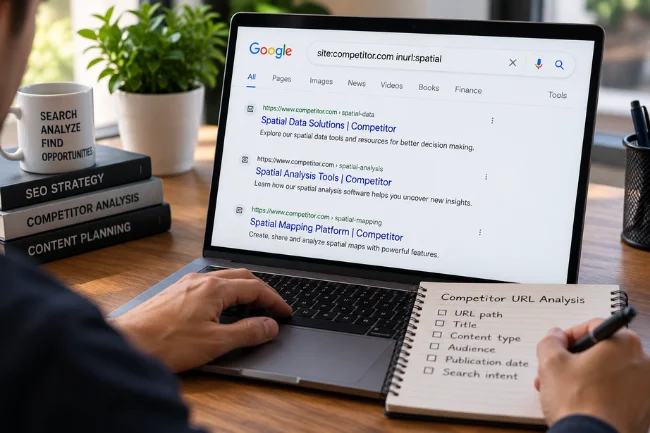
site:competitor.com inurl:spatial
This can reveal whether the site has a spatial topic hub, a repeated folder structure, or several pages built around related terms. I record the URLs I can see, then classify them by format and intent rather than treating the result count as a fact.
Find documents instead of ordinary pages
Add filetype:pdf when you want reports, manuals, syllabi, white papers, or downloadable research:
inurl:spatial filetype:pdf GIS
A document format is not a quality signal. Check the author, publisher, date, references, methodology, and revision history before relying on a PDF.
Remove a competing meaning
If one interpretation dominates the results, exclude it:
inurl:spatial GIS -audio -computing
Exclusions are best used after you observe a problem. Adding a long list preemptively can remove useful interdisciplinary material.
Inurl: vs. Other Search Operators
Each operator answers a different question. Mixing them makes sense only when their jobs are clear.
| Operator | What it filters | Example | Best question it answers |
|---|---|---|---|
inurl: | Text in a URL | inurl:spatial | Which visible URLs use this term? |
site: | A domain, URL, or prefix | site:example.com spatial | Which results come from this web property? |
intitle: | Words in a page title | intitle:spatial GIS | Which pages emphasize the term in their title? |
filetype: | Document format | spatial filetype:pdf | Which results use a particular file type? |
"phrase" | A phrase match | "spatial database" | Which results closely match this wording? |
-term | An unwanted term | spatial -audio | Which results remain after removing a meaning? |
before: / after: | Date boundaries | spatial after:2025-01-01 | Which results fall around a time boundary? |
The site: operator has clearer official guidance. Google Search Central says site: results are not necessarily exhaustive and should not be used to calculate the exact number of indexed URLs. That warning is a useful model for any operator-based audit: a search result is a lead, not a database export.
You may also encounter allinurl: in older tutorials. It is intended to place multiple words under a URL-focused condition, but it is not included in Google’s current public operator list. I prefer combining a single inurl: filter with descriptive terms because the query is easier to read, test, and explain.
How I Use Inurl for SEO Research
The operator does not improve rankings. Its SEO value comes from the questions it helps me ask about a site or topic.
Map a competitor’s visible URL footprint
Suppose a competitor publishes content about mapping software. I might begin with:
site:competitor.com inurl:spatial
For each useful result, I note the URL path, title, content type, apparent audience, publication date, and search intent. A cluster of /spatial-data/, /spatial-analysis/, and /spatial-mapping/ pages may suggest a deliberate content architecture.
The insight comes from the pattern, not the number of results. A competitor may have pages that the query misses, URLs that redirect, duplicates, canonical alternatives, or content whose address lacks the word “spatial.”
Identify content gaps without copying competitors
Visible pages can reveal unanswered questions. If several competitors define spatial data but none compare file formats, document data licensing, or show quality-control methods, those omissions are more valuable than another generic definition article.
I turn gaps into reader problems: What decision is difficult? What evidence is missing? What would save someone time? This keeps competitor research focused on usefulness rather than imitation.
Review URL taxonomy
An inurl: search can expose inconsistent naming. A site might use /spatial-data/, /geospatial/, /gis-resources/, and /location-intelligence/ for closely related material.
That variation is not automatically wrong, but it can signal fragmented navigation or overlapping content. Confirm the issue with a proper crawl and internal-link review before recommending URL changes. Renaming established URLs carries redirect, canonical, linking, and migration risks.
A Better Way to Read the Results: The URL-Layer Method
One detail many explanations miss is that a matching URL contains several information layers. Reading those layers separately makes the query more useful.
- Host layer: In
spatial.example.com, the term identifies a subdomain or product area. - Directory layer: In
example.com/spatial/reports/, it may represent a permanent content category. - Slug layer: In
example.com/how-spatial-indexes-work/, it describes one page. - File layer: In
example.com/files/spatial-plan.pdf, it labels a downloadable asset. - Parameter layer: In
example.com/search?topic=spatial, it may represent a filter or dynamically generated view.
These placements do not carry equal meaning. A dedicated subdomain suggests a larger organizational commitment than a single article slug. A query parameter may expose an internal search page rather than a curated resource.
When I assess results, I label the layer before drawing conclusions. This simple classification prevents a common error: assuming every matching URL represents a strategic topic page.
Using Inurl for GIS and Academic Research
For subject research, add vocabulary from the discipline you actually mean:
inurl:spatial GIS data qualityinurl:spatial "coordinate reference system"inurl:spatial PostGIS indexinginurl:spatial site:gov filetype:pdfinurl:spatial site:edu curriculum
Institutional domains can help with discovery, but a domain suffix does not replace source evaluation. A student project and a peer-reviewed research center can live under the same university domain.
I check who created the material, which organization maintains it, when it was updated, where its data originated, and whether the methods can be reproduced. For spatial datasets, I also look for coordinate systems, geographic coverage, resolution, licensing, collection dates, and known limitations. Those details determine whether a resource is usable, not the presence of “spatial” in its address.
What Inurl Cannot Tell You?
It cannot prove complete index coverage
Search operators return a selection of results, not a certified list of every indexed URL. Localization, language, query wording, ranking systems, and changing search infrastructure can affect what appears.
For a site you control, use Google Search Console’s URL Inspection tool to examine a specific page’s indexed version and indexability. Use Page Indexing reports, sitemaps, server logs, and a crawler for broader diagnosis.
It cannot prove topical relevance
A URL can contain “spatial” while the page offers little useful spatial information. It may be a tag archive, an internal search result, an old product page, or a passing reference.
It cannot measure authority or accuracy
A neat URL is not evidence of expertise. Review authorship, citations, ownership, editorial standards, and technical correctness.
It cannot reveal search demand
Finding many matching URLs does not prove that people search for the topic. Keyword research, Search Console performance data, audience questions, and customer evidence serve different purposes.
It cannot improve rankings by itself
Running the query changes nothing about a site’s visibility. It can inform research, but rankings depend on the usefulness, accessibility, relevance, and overall quality of the published page.
Common Mistakes to Avoid
The most frequent error is adding a space after the colon. Use inurl:spatial, not inurl: spatial.
Another mistake is confusing a URL match with semantic understanding. The operator looks for text in an address; it does not mean “show me everything related to spatial science.”
Avoid treating the displayed result count as an audited total. Search counts can be approximate and may shift as you paginate or refine the query.
Do not stack operators until the query becomes impossible to interpret. Change one variable at a time and record what it did.
Finally, do not use operator searches to probe private systems, exposed credentials, or sensitive files. Legitimate research should respect authorization, privacy, copyright, and a website’s terms.
A Practical Quality Checklist
Before acting on an inurl:spatial result, ask:
- Does the page match the meaning of “spatial” I intended?
- Is the match in the host, directory, slug, file, or parameter?
- Who wrote and maintains the page?
- Is the content current enough for my purpose?
- Are its data, claims, and methods documented?
- Is the URL canonical, redirected, duplicated, or archived?
- Have I verified important conclusions with Search Console, a crawler, or the original source?
This takes longer than copying a list of links, but it turns a loose search into defensible research.
Frequently Asked Questions
What does inurl mean?
It asks a search engine to find pages whose URLs contain the word “spatial.” It filters URL text rather than performing a geographic or database query.
Is inurl an official Google operator?
inurl: is widely used in Google searches, but it is not listed in Google’s current public Search Help summary of popular operators, so treat its behavior as a discovery aid rather than a guaranteed report.
Can I combine inurl with site:?
Yes. A query such as site:example.com inurl:spatial can help uncover visible URLs containing “spatial” on one domain.
Does inurl show every indexed spatial page?
No. Operator results are not exhaustive, and relevant pages may use URLs that do not contain the word “spatial.”
Can inurl help with competitor research?
Yes. It can reveal visible URL patterns, topic clusters, and content formats, but confirm findings with manual review and a proper site crawl.
Use the Query as a Lens, Not a Scoreboard
inurl:spatial is most useful when you give it a clear job. Use it to discover resources, inspect URL patterns, narrow a spatial-research topic, or generate questions for a deeper audit. Do not use it as proof of index coverage, authority, demand, or ranking strength.
Start with the basic query, add one intent term, and classify the useful results by URL layer and content purpose. Your next action should be verification: open the source, check its credibility, and confirm any SEO conclusion with the appropriate first-party data or crawling tool.

Midori Michael is an independent digital content research writer with 8+ years of experience creating well-researched articles on digital marketing, business, technology, and lifestyle topics. She focuses on simplifying complex information through accurate research and clear editorial writing.